The Curious World of MCP Servers
Introduction
Using AI assistants for software engineering has practically become non-optional for tech workers. At NVIDIA, I routinely use AI assistants for software engineering - to the point where I have been warned about my excessive token usage. More specifically, I use Cursor in agent mode in combination with Claude 4.5 Opus on MAX mode (which according to benchmarks has the best performance for software engineering and coding tasks). But recently I unlocked another level of performance and productivity by enabling a number of MCP servers in Cursor. I’ve been somewhat skeptical of the power of MCP servers and have put off trying them out. But momentum for internal MCP servers at NVIDIA has been building for a while now, so I gave them a try.
I started with a handful of servers (to focus on the most prominent use-cases and not overwhelm Cursor/Opus with too many tools):
- [Directory] A server for querying the internal employee directory
- [Slack] A server for sending and receiving messages from Slack (Slack is a messaging platform used at NVIDIA but also more widely used in the industry)
- [JIRA] A server for querying the internal JIRA instance, creating new issues, and updating issue statuses (JIRA is a project management tool used at NVIDIA)
- [Gerrit] A server for querying the internal Gerrit instance (Gerrit is used as a code review system in our project)
- [NVIDIA MCP Suite] A collection of servers for interacting with the internal knowledge bases (Google Drive, Confluence, Sharepoint, etc.). Out of these, the Google Drive server has been the most useful so far for my daily work.
In the rest of this post I’ll use Cursor / Sonnet / Opus / LLM interchangeably to refer to the same thing - an agentic AI assistant orchestrated by Cursor that uses a large language model (LLM) with access to MCP servers.
What Are MCP Servers?
Before discussing workflows that use MCP servers, it’s worth taking a step back to explain what MCP servers actually are.
MCP stands for Model Context Protocol. An MCP server is a service that enables foundation models to securely and dynamically interact with external tools, resources, and data sources over a standardized protocol. By operating as a kind of “middleware,” MCP servers allow models - such as those from OpenAI or Anthropic - to access live information, trigger automations, fetch files, integrate with company systems like directory or project management, and much more. This goes far beyond what a static language model can do based on its training data alone (which only contains data up to a certain cutoff date).
The protocol defines a clear, secure interface for exchanging context and commands between a language model and the external world. Companies can run their own internal MCP servers to expose business-relevant APIs (e.g., HR directory, project trackers, or messaging apps) and tightly control what the AI can see and do, maintaining both utility and security. In practice, when an AI assistant has MCP server access, it can be much more proactive, useful, and up-to-date - because it can look up, summarize, or even act inside the actual tools used every day.
The official standard was originally introduced by Anthropic in their Model Context Protocol announcement. It has been widely adopted by other AI companies and is now a de facto standard for foundation models interacting with external tools and data sources. A number of tutorials are available for developing MCP servers (like this one). In this post, I won’t go into the details of MCP server development. Instead we’ll use off-the-shelf MCP servers (either NVIDIA-internal or open-source) for our workflows.
The Motivating Use-Case
I recently took over leadership of a new project within NVIDIA’s autonomous driving project. Leading a new project requires gathering a lot of context in a short amount of time - the “getting up to speed”-phase of a project. In pre-AI days, I would have started by reading a lot of design documents, meeting notes, and code as well as listen in on status meetings and have 1:1 meetings with key stakeholders.
Having access to a Slack and a directory MCP server, I tried to speed up the process the following way:
- Provide the new project’s daily status notes to the LLM (or a subset thereof to avoid overwhelming the context window)
- Provide the Slack channel for this particular project (mostly to determine the set of people involved and to derive a mapping of people to topics / tasks)
- Provide the directory MCP server to look up the names and email addresses of the people and their reporting structures.
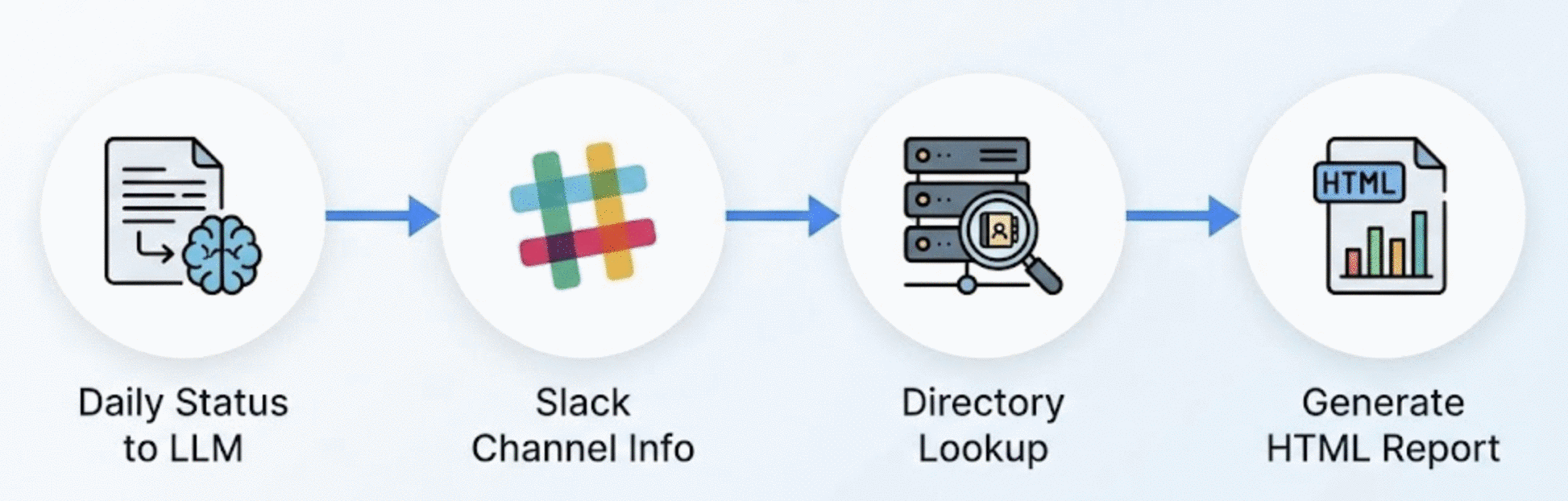
Cursor grouped all contributors on the project into thematic groups (e.g. leadership, model architecture, data, etc.) and provided additional context for each member of the group (location, role, expertise, most prominent contribution, etc.). Besides the high-level overview, the final HTML report also contained detailed technical contributions for each person as well as major wins and deliverables for the current week. Cursor also included some hallucinations, so don’t take everything at face value without verifying.
Overall, Cursor significantly sped up all steps of creating this report:
- Gathering context from various data sources
- Synthesizing and structuring / grouping information
- Augmenting information with additional context from the directory MCP server
- Presenting information in a structured and easily digestible HTML report
Use-Cases
This initial use-case presented another step function in my productivity at work (the first one being the use of Cursor for actual software development). MCP servers enabled a similar productivity gain for non-coding tasks (project management, personnel management, recruiting/interviewing, status updates, personal development, and so many more). I’ve gotten into a habit of thoroughly documenting these use-cases - after completing a new experiment and generating useful artifacts, I ask Cursor to update my use-case document at work. This blog post presents a cleaned up version of that use-case document without any of the sensitive details.
🐛 Bug Triage & Feature Development
Automating On-Call User Requests to Production Code
Oftentimes, on-call user requests (be it bug reports or feature requests) are fairly contained in scope and can be implemented by an AI assistant mostly autonomously. The main body of work is triaging the request, understanding the scope and impact, and creating the required documentation (e.g. in the form of a JIRA ticket) and artifacts for the request (code, tests, Git commit message that also links to the JIRA ticket) and then executing the request.
What enabled me to automate that entire workflow was a combination of Slack and JIRA MCP servers and the following prompt:
Triage the issue reported in Slack thread <slack-thread-id> and propose
a solution to the issue. Before working on the fix, create a JIRA ticket
and a step-by-step implementation plan. Only then start implementing the
solution and unit test the implementation. Commit the changes to the
repository and create a Git commit including a message and link to the
newly created JIRA ticket. Follow the instructions in jira.md to create
new JIRA tickets.

The new feature should be added to code_file_x while new tests should be
added to test_file_y.
Note that the more context you can provide to the LLM, the more likely it is to generate a useful solution (for example in the prompt above, I provided the code file and test file to be modified). But additional context can be as little as a starting point (i.e. a seed code file or directory) for the LLM to explore the codebase from.
I also want to point out the reference of a jira.md file which is a Cursor rules file that contains the instructions for creating JIRA tickets that comply with our project-specific, internal requirements.
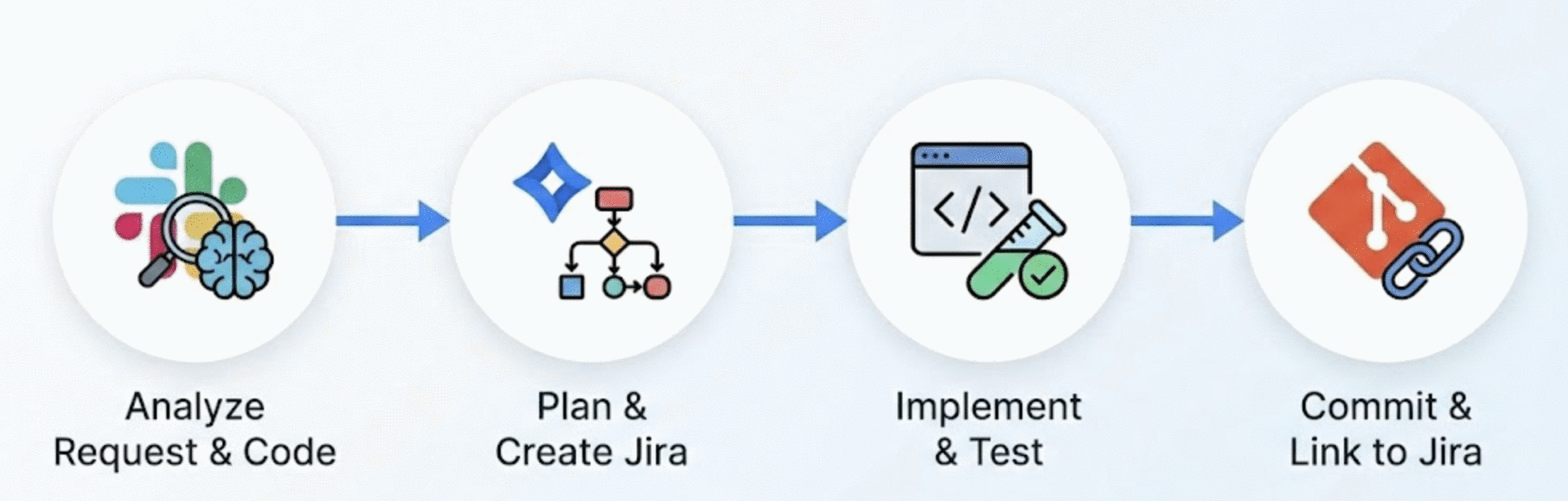
The workflow:
The end-to-end workflow below includes all steps from identifying a problem reported by a user in a Slack thread to implementing, testing, and deploying a solution with full project management integration.
Problem Discovery: Ask Cursor to analyze the Slack thread, and identify the problem.
Code Analysis: Ask Cursor to analyze the relevant code file to understand the context (seed file plus adjacent files) and identify the problem / required feature.
Solution Design: Ask Cursor to propose a solution design and break it down into a series of tasks to be executed.
Implementation: Ask Cursor to implement the solution in the codebase and check off all tasks from the solution design. Using the newly implemented unit tests, Cursor can verify that the implementation is correct. Using the checklist, Cursor can verify that the design has been followed.
Git Commit & Jira Integration: Use the Jira MCP server to automatically create a ticket documenting the change, then commit the code with a reference to the ticket.
Key insights:
- This workflow works well for small, contained feature requests or bug fixes (which on-call requests often are). This is most likely not the best approach for large scale feature development or refactoring - the LLM may not have the context to understand the overall architecture and impact of the changes.
- The more context you can provide to the LLM, the more likely it is to generate a useful solution (pointing the LLM to a good starting point / seed file in the codebase is often sufficient).
Automated Gerrit Code Review
This use-case shows how MCP integration with a code review system (Gerrit) can provide comprehensive, structured code reviews with security and quality analysis. The MCP Gerrit integration approach is specifically useful for reviewing changes that are already on Gerrit (not in your local workspace) and analyzing CLs from other team members.
Note: Cursor recently added a built-in code review agent (accessible via Command Palette → “Start Agent Review”) that can analyze local git diffs and uncommitted changes. The MCP Gerrit integration approach documented here is specifically useful for:
- Reviewing changes that are already on Gerrit (not in your local workspace)
- Analyzing CLs from other team members
- Fetching existing review comments and context
- Systematic review of multi-file changes with structured output
Both approaches are complementary: use the built-in agent for pre-commit reviews, and MCP Gerrit integration for reviewing others’ CLs or post-commit analysis.
Challenges:
- Manual code review requires opening Gerrit UI, reading diffs, understanding context
- Easy to miss security issues (e.g. hardcoded secrets)
- Time-consuming to analyze large CLs with multiple files
- Need to provide actionable, structured feedback
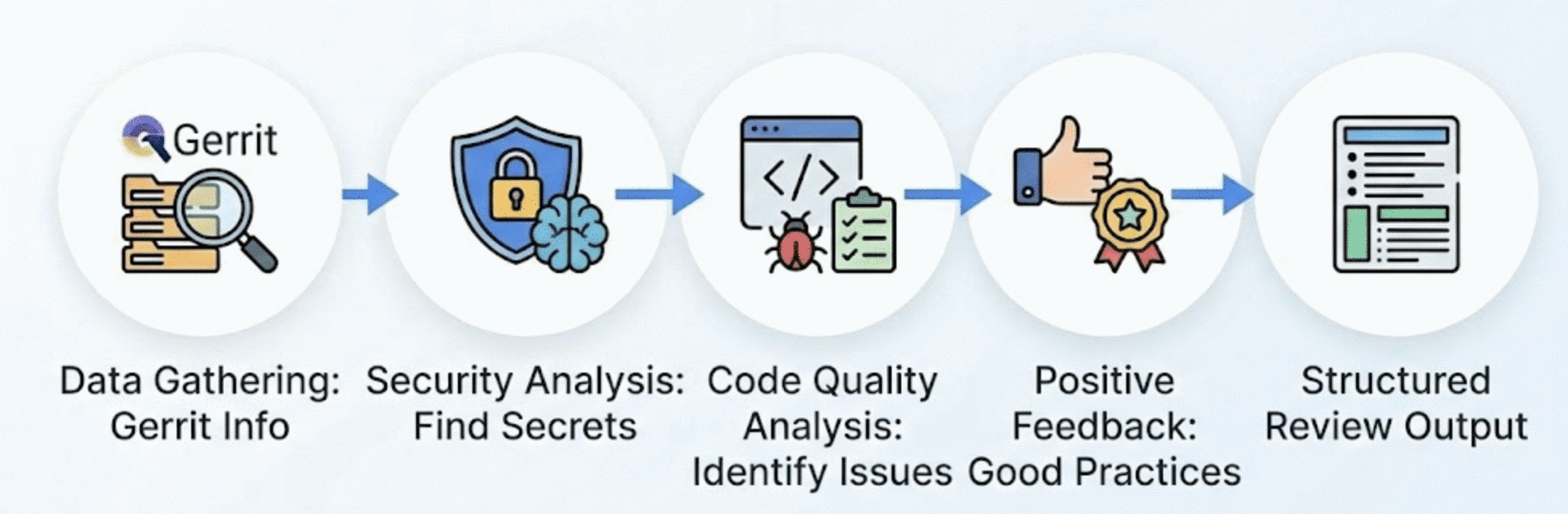
The workflow:
Data Gathering: Given a code review URL, the MCP Gerrit integration fetches the file list, existing review comments, and full diffs for all modified files.
Security Analysis: The AI scans for security issues like hardcoded secrets.
Code Quality Analysis: The review identifies patterns like reinventing existing utilities, error-prone code construction, and test organization issues. It also provides specific recommendations with code examples.
Positive Feedback: The review acknowledges good practices - comprehensive test coverage, well-structured code, thorough documentation, and proper integration patterns.
Structured Output: The final review follows a consistent format: Critical issues → Quality issues → Positive aspects → Suggestions → Checklist for the author.
Key insights:
- Understanding why code exists is crucial. What appears as a security mistake may be a deliberate temporary workaround discussed with infrastructure teams. The AI helps surface issues, but human judgment is still needed for prioritization and context.
- Context from existing comments valuable: If somebody has already commented on the code, it is valuable to include that context in the review. A human reviewer could leave high-level comments that provide crucial context while the LLM can do a more detailed analysis of the code.
- This workflow may need multiple passes for very large CLs (>100 files) given the context window limitations of the LLM.
- The LLM has limited understanding of business logic without broader context (i.e. without access to the broader system architecture, product requirements, etc.).
- Reviewing code is a task that requires a lot more context than writing code. Previous design decisions, code architecture, context from conversations with other engineers, product managers, etc. are all crucial for a comprehensive review. Such comprehensive context is non-trivial to provide to the LLM, which is why code reviews are still mostly done manually. Just in recent months, I’ve seen a number of tools that aim to automate code reviews more (e.g. via OpenAI’s Codex or Cursor’s built in code review capabilities).
Future Enhancements:
A number of improvements are possible to make this workflow more robust and effective - most of them related to context engineering, i.e. how to provide the LLM with enough context to perform the review well.
- Integrate with static analysis tools (linters, security scanners)
- Build knowledge base of common patterns/anti-patterns
- Add automatic severity classification
- Link to coding standards documentation
- Generate metrics (review time, issues found, etc.)
- Cross-reference with Slack/Jira to understand context behind decisions (e.g., why temporary workarounds exist) - ideally this would be documented by engineers via in-line comments/links in the code that can be dereferenced via Slack or Jira MCP servers. That way, the LLM can get the context it needs to understand the code and the decisions made by the engineers.
- Surface related team discussions when security patterns are detected
📋 Project Management
Automated Jira Ticket Creation
This use-case establishes an automated Jira ticket creation workflow via MCP with proper attribution and best practices. For this workflow, I am using the open-source Atlassian MCP server which provides an MCP server for Atlassian products such as Jira and Confluence.
Note that this workflow requires write permissions to the Jira instance - use this workflow with caution to avoid creating tickets in the wrong project, with the wrong assignee, or creating large numbers of tickets and spamming the Jira instance.
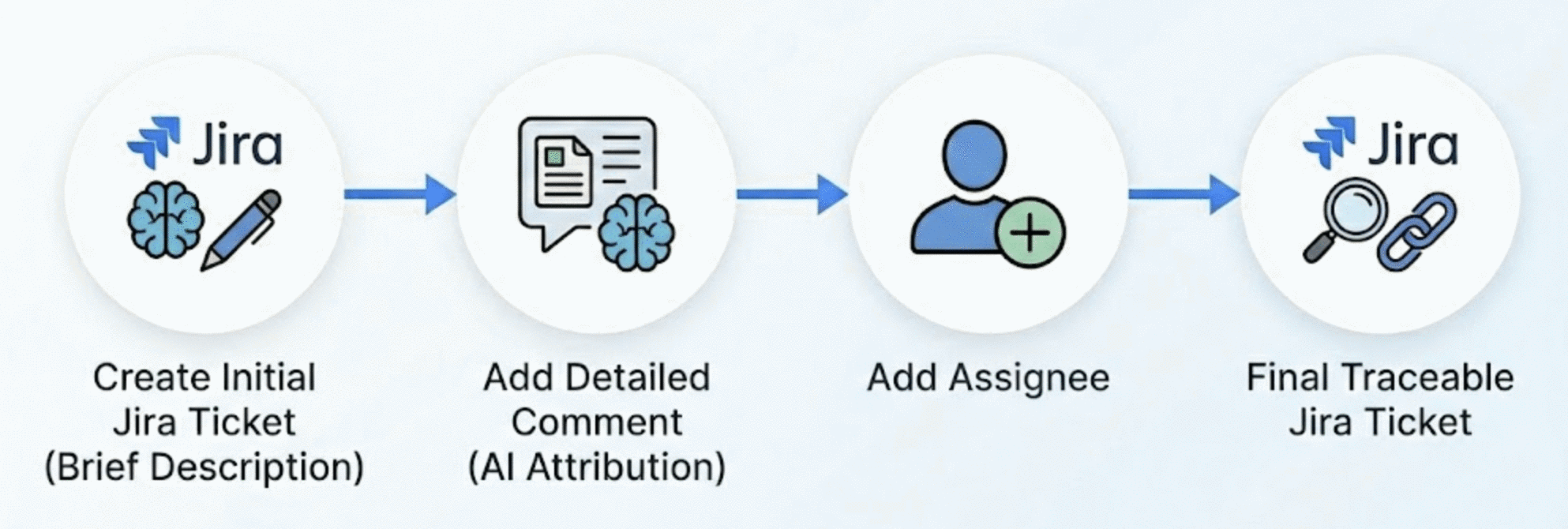
Best practices established:
- Always add “Ticket created by AI assistant” to descriptions for traceability - we want these auto-generated tickets to be clearly identifiable as such.
- Keep initial descriptions brief; add details via comments after creation
- Use a two-step process: create ticket with minimal info, then add detailed comments
- Test with a dummy ticket first to verify write access
This two-step ticket creation process (ticket first, then details in the comment) was my first stab at automating this (and done to avoid timeouts with the JIRA MCP server). However, from what I have seen, it is more common to add all details to the ticket in a single description (which in my opinion provides a better one-stop-shop overview for what the ticket is about).
Key learnings:
- Brief description + detailed comment is more reliable than a single long description (a single long description has led to API timeouts in the past)
- Clearly identifying auto-generated tickets as such is crucial for traceability and accountability.
Slack Mention Summarization
This use-case automates searching and prioritizing Slack messages in which you’ve been tagged, categorizing them by urgency and action required.
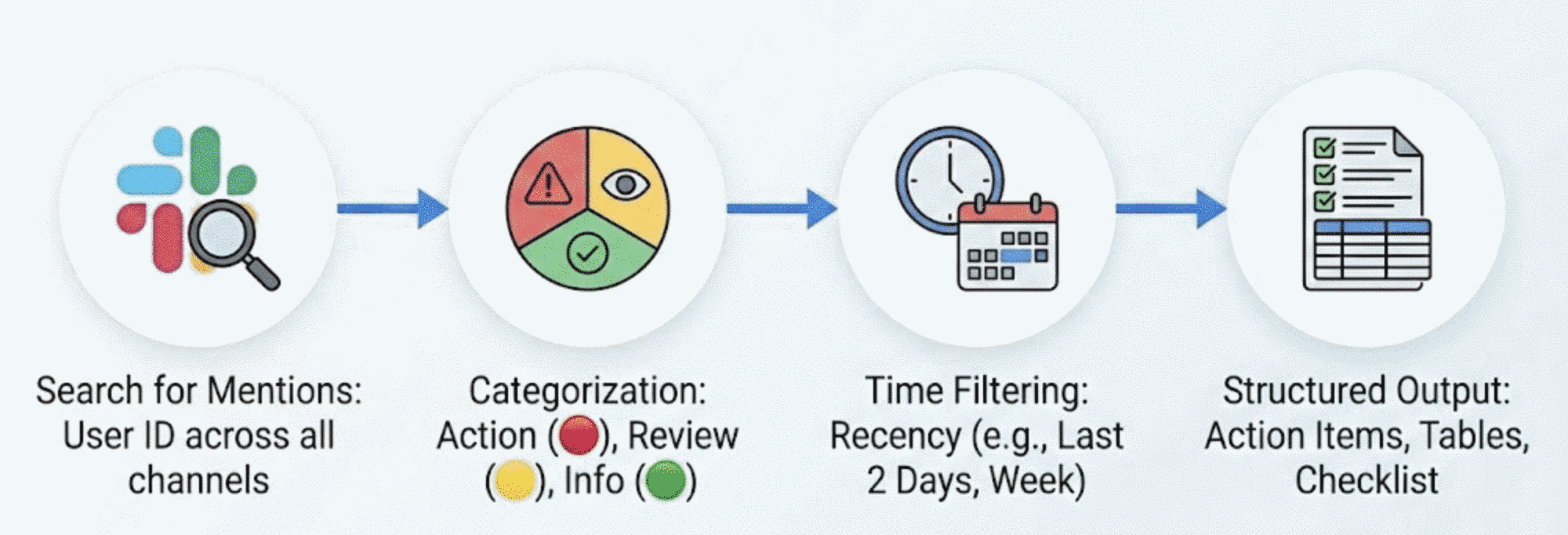
The workflow:
Search for Mentions: Use MCP Slack integration to search for messages mentioning your user ID across all accessible channels.
Categorization: Messages are automatically categorized into three priority levels:
- 🔴 Action Required: Direct questions, review requests, blockers, handoff requests
- 🟡 Review/FYI: Deployments to review, meeting prep, awareness items
- 🟢 Informational: Cross-posts, announcements, confirmations
Time Filtering: Filter by recency—last 2 days for daily review, last week for weekly catchup, or custom date ranges.
Structured Output: Generate a summary with action items at the top, tables for lower-priority items, and a final prioritized checklist.
Categorization rules:
- MR/CL review requests → Action Required
- Direct questions to you → Action Required
- Handoff/takeover requests → Action Required
- Staging deployments for review → Review
- Cross-posts of announcements → Informational
- Acknowledgments/thanks → Informational
The set of rules is work-in-progress and being updated as I (or Cursor) discover new patterns and categories of messages.
Variations of This Workflow
There is a number of variations and extensions of this basic Slack workflow I use. Especially when I am juggling a large number of concurrent threads and conversations or when I have been out of office for a few days, being able to answer the following questions programmatically has been a huge time saver:
- Which conversations was I part of today? What’s the summary of my Slack activity today?
- What do I need to follow up on in Slack tomorrow?
- What did I miss on Slack when I was out yesterday?
- Which channels, threads was I active in yesterday?
- Which projects did I push yesterday?
- Which open questions did I follow up on yesterday?
- What has person X been working on today / yesterday / over the last (N) days / weeks?
Given the public nature of Slack, it is easy to imagine that this workflow could be used to track the activity of other engineers in the organization (which is what the last question above demonstrates). This is perhaps the most questionable use-case of this workflow. Not everybody is comfortable with the idea of being tracked like this - especially since Slack provides just a partial picture of a person’s daily work and is bound to skew the picture towards more publicly visible activities.
Future Enhancements:
- Combining Slack with other MCP servers like JIRA could enable powerful bots that, for example, send a daily digest of tasks I should complete or identify open questions I should follow up on. This could be a powerful tool for a manager to delegate tasks (assuming engineers and PMs are diligent in filing JIRA tickets - which is far from guaranteed).
- Similarly, based on Slack activity alone, this workflow could be used to send yourself a daily digest of tasks to complete (by also providing write permissions to the Slack MCP server).
- Ideally, this workflow could be extended to other communication channels like email and most notably meetings (Teams, Zoom, Webex, etc.). Given the availability of AI-powered transcription tools, it should be possible to transcribe meetings and then use the same workflow to summarize the meeting notes (and pick out any mentions or questions that need to be followed up on).
Creating a New JIRA Issue
👥 People & Performance Management
Performance Review Data Gathering
This use-case demonstrates automated collection and analysis of employee contributions from Slack to support performance reviews and promotion decisions. I have used this to gather material for my own self-evaluation for the annual performance review (in addition to scouring my daily work logs, Gerrit code contributions, etc.).
The challenge:
- Manual review of months of Slack activity across dozens of channels is extremely time-intensive
- Need to identify specific examples demonstrating key competencies
- Must synthesize scattered information into a coherent narrative
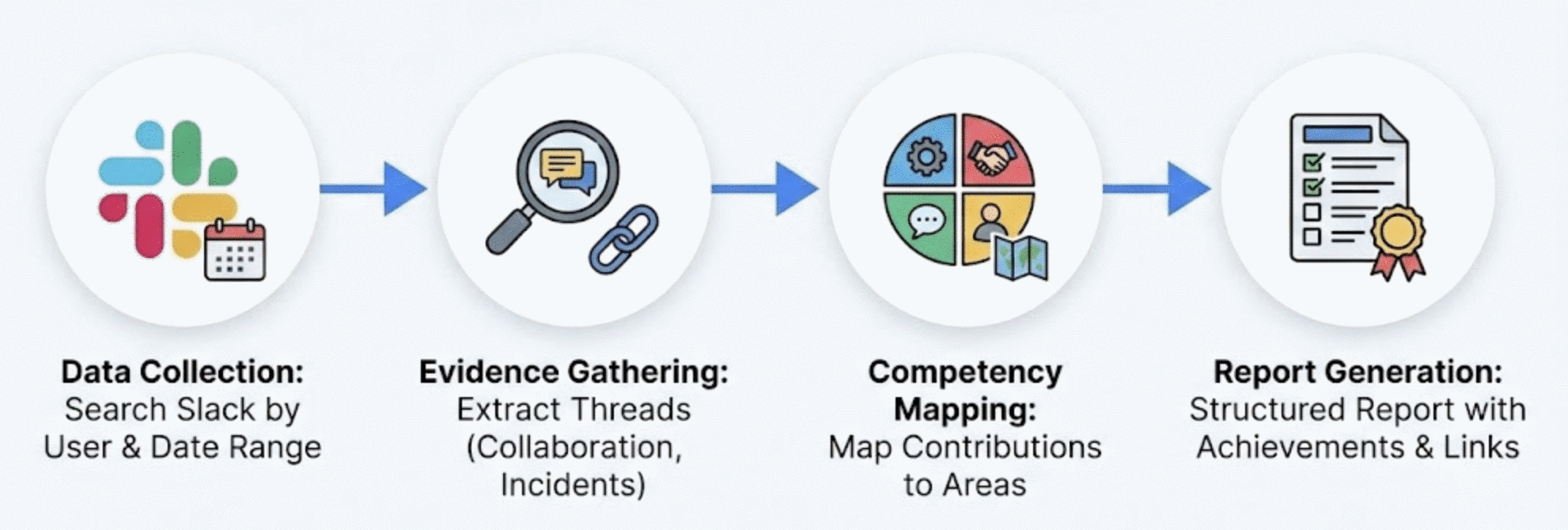
The workflow:
Data Collection: Use MCP Slack integration to search for an engineer’s messages over a review period (e.g., 2 months), filtering by user ID and date range.
Evidence Gathering: The AI extracts threads showing collaboration, technical discussions, incident response ownership, and cross-team coordination.
Competency Mapping: Contributions are grouped and mapped to competency areas like technical depth, ownership, collaboration, and communication.
Report Generation: Generate a structured report with executive summary, major achievements, competency assessment, areas for improvement, and supporting links (documents, Slack threads, tickets).
Quality improvements:
- Comprehensive coverage (hundreds of messages analyzed)
- No recency bias (equal weight to entire review period)
- Specific evidence cited with quotes, links, and dates
- Consistent competency framework application
The same considerations discussed in the Slack mention summarization workflow apply here — specifically, that not everybody is comfortable with the idea of being tracked / evaluated like this. When in doubt, ask for explicit consent from the affected person before using this workflow. For example, I only use this workflow to analyze my own accomplishments or others with explicit consent, focusing solely on work-relevant channels and professional contributions.
Interview Question Generation
This use-case automates the creation of tailored interview questions from candidate resume data, generating structured multi-part questions with natural bridges to your team’s work.
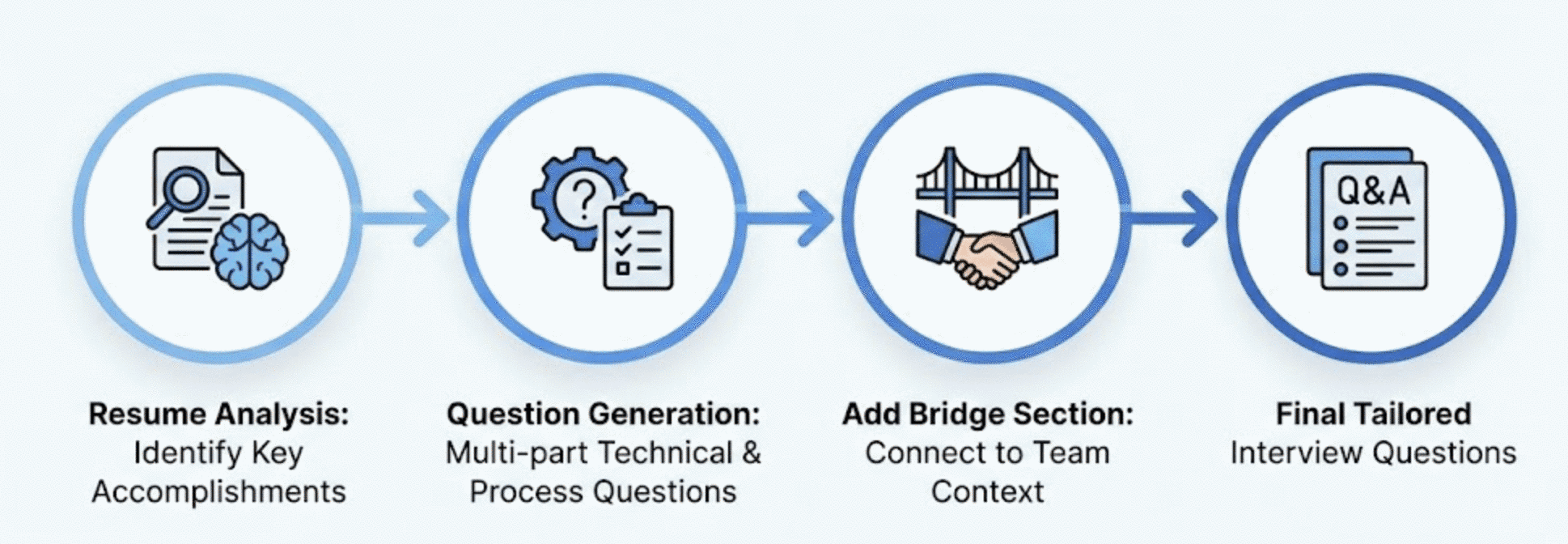
The workflow:
Resume Analysis: Provide a candidate’s relevant resume section(s). The AI identifies key accomplishments, especially quantified ones (percentages, scale numbers, cost savings, cross-team impact).
Question Generation: For each major accomplishment, generate a multi-part question with:
- Context acknowledgment (show you read their resume)
- Technical decision probing (“How did you design…”)
- Process/collaboration questions (“What was your process for…”)
- Scale/impact questions (“What were the key challenges in scaling…”)
Bridge Section: Each question includes a “bridge” that naturally transitions to your team’s context, helping assess adaptability and fit.
Below is a full example I generated based on my own resume, in particular my work at NVIDIA. This example assumes that I am applying for the “Senior Software Engineer, Metrics and Evaluation - Autonomous Vehicles” position (unfortunately the detailed role description is no longer available online). Below is a snippet from my resume that we’ll base the questions on.
NVIDIA — Staff Software Engineer / Tech Lead
📍 Santa Clara, California, USA | 📅 April 2024 – Present
| Area | Accomplishments |
|---|---|
| Evaluation Systems | Lead the design and implementation of evaluation system for NVIDIA’s end-to-end planning stack for autonomous vehicles |
| Data Products | Build compelling data-driven evaluation products by combining on-road driving analysis, large scale simulation, models, metrics, and dashboards (used by 250+ daily active users) |
| ML/AI Models | Contribute to development of novel VLA models for autonomous driving (based on NVIDIA’s Alpamayo-R1) |
| Foundation Models | Incorporate latest foundation models (VLMs, LLMs) into evaluation workflows (e.g. LLM-as-judge) |
| Infrastructure | Design and implement large-scale distributed data and evaluation pipelines, data formats, and data storage backends |
The questions below have been generated by Cursor without any further manual input or context engineering.
Question A: Evaluation System Architecture & Scale
“In your current role at NVIDIA, you’re leading the design and implementation of an evaluation system for the end-to-end planning stack, with data-driven products used by 250+ daily active users. Can you walk us through:
System architecture decisions - What were the key architectural choices you made when designing the evaluation system? How did you structure it to serve both real-time on-road driving analysis and large-scale simulation results? What tradeoffs did you navigate between flexibility and standardization?
User adoption strategy - With 250+ daily active users relying on your dashboards and products, how did you approach the product design to ensure adoption? What feedback mechanisms did you implement, and how did you balance the needs of different user personas (engineers, leadership, domain experts)?
Data pipeline scalability - You mention large-scale distributed data pipelines and storage backends. What were the most significant scaling challenges you faced, and how did you design the data formats and storage architecture to handle the volume and variety of evaluation data?”
Bridge to Team Context
“We’re building evaluation infrastructure that needs to serve multiple teams with different analytical needs while maintaining consistency in how we measure autonomous vehicle performance. How do you think about creating evaluation primitives that are both reusable and expressive enough to capture domain-specific nuances?”
Why this bridge matters:
- Explores their ability to balance standardization with flexibility
- Reveals their philosophy on evaluation system design
- Opens discussion on our specific evaluation challenges
Question B: Foundation Models in Evaluation (LLM-as-Judge)
“You’re incorporating foundation models—VLMs and LLMs—into evaluation workflows, including ‘LLM-as-judge’ approaches. This is a rapidly evolving area. Can you tell us about:
Use case selection - What specific evaluation problems are you solving with LLM-as-judge that traditional metrics couldn’t address? How did you identify where foundation models add value versus where deterministic metrics are more appropriate?
Validation and calibration - How do you validate that your LLM-based evaluations are reliable and consistent? What’s your approach to handling hallucinations, prompt sensitivity, and ensuring reproducibility across model versions?
Integration architecture - How did you design the integration of these foundation models into your existing evaluation pipelines? What were the key considerations around latency, cost, and failure modes when running LLM evaluations at scale?”
Bridge to Team Context
“We’re exploring similar applications of foundation models for evaluation—particularly for assessing planning quality in complex scenarios that are hard to capture with traditional metrics. What principles would you apply when deciding whether a given evaluation task is a good fit for LLM-based assessment versus traditional approaches?”
Why this bridge matters:
- Assesses their judgment on when to apply emerging techniques
- Reveals depth of hands-on experience with LLM evaluation pitfalls
- Connects to our active exploration in this space
Key Areas to Probe Based on Resume
- 7+ years of AV experience across two major programs (Apple, NVIDIA)
- Progression from IC to Tech Lead role
- Unique combination of ML engineering + evaluation expertise
- Experience with both traditional and foundation-model-based evaluation
Potential Red Flags to Watch For
| Signal | Why It Matters |
|---|---|
| Vague answers about “novel” or “leading” claims | Probe for specifics to verify depth |
| Unable to articulate sim-to-real validation approaches | Core competency for evaluation role |
| Lack of depth on LLM-as-judge failure modes | Current focus area requires hands-on experience |
| Difficulty explaining technical concepts to non-technical stakeholders | Essential for senior role |
Strong Signals to Look For
| Signal | Why It Matters |
|---|---|
| Concrete metrics on evaluation system usage and impact | Evidence of real-world influence |
| Nuanced understanding of when ML evaluation is appropriate vs. overkill | Shows judgment and maturity |
| Clear mental models for scenario coverage and validation | Fundamental evaluation competency |
| Evidence of influencing team/org direction through evaluation insights | Leadership indicator |
Key insights:
- The generated questions are fairly comprehensive and cover a lot of ground. These questions are meant to be introductory and not occupy the majority of the interview time. Instead of going through them in detail, use them more as a buffet of topics to choose from.
- The resume analysis step can focus on different aspects that are important to a given role (e.g. extract quantifiable accomplishments - percentages, scale numbers, cost savings, cross-team impact, etc.). Modify the prompt accordingly.
- The question design starts with context to set up the question and uses a 3-part structure to enable a natural progression from architecture -> process -> scale.
- The questions focus on the “how” and “why” not just the “what” to probe for the candidates understanding of how their work fits into the broader context of the team and the company. This is becoming increasingly important for senior roles.
- I’ve found a few effective patterns in my questions that elicit specific narratives from the candidate:
- “Can you walk us through…” (invites narrative)
- “How did you define and measure…” (probes rigor)
- “What was your process for balancing…” (reveals tradeoff thinking)
- “What were the key challenges in…” (surfaces problem-solving)
Interview Notes Summarization
I have been interviewing an increasing number of candidates recently (up to 3 a week) and while the preparation time for each interview is sub-linear (given that I can reuse a question I am well-calibrated on), the interview post-processing time scales linearly with the number of candidates. As such, I have been experimenting with structuring my interview notes in a way that makes them more easily digestible by an LLM. This use-case automates the analysis of interview notes to generate structured candidate evaluations with rubric-based scoring.
I do want to point out that I view the LLM-generated evaluations as a starting point for my own evaluation. While I am more willing to trust code generated by LLMs (because it can be easily verified via tests), automated evaluations of candidates are not as trustworthy (for a number of reasons, e.g. because written notes miss non-verbal cues and context about a candidate’s performance) and need to be verified and put into context by the interviewer. In that sense, I use an LLM-assisted summarization approach rather than a fully hands-off one.
To simplify the process of summarizing interview notes, I recently started using tags in my notes to provide additional non-textual context to the LLM. I found that oftentimes, the LLM would give the candidate a glowing review based on my notes because I did not capture enough context about the conversation.
Challenges:
- Raw interview notes are often unstructured and chronological rather than thematic
- Extracting signal from interviewer tags ([CQ], [CS], [Q]) requires careful interpretation (e.g. [CQ] is not always a negative signal, more on the exact meaning of these tags in the next section)
- Synthesizing technical depth, communication quality, and domain knowledge into actionable verdicts is time-consuming
- Need consistent scoring framework across candidates and interviewers
In particular, I introduced the following tags into my notes:
| Tag | Meaning | Impact on Assessment |
|---|---|---|
[INTERVIEWER] |
Prompt/question | Neutral - sets context |
[Q] |
Follow-up question from the candidate | Neutral - natural flow |
[CQ] |
Clarifying question asked by interviewer | Slightly negative if excessive - candidate should have been clearer |
[CS] |
Clarifying statement explaining concept by the interviewer | Negative - gap in expected knowledge |
I expect the set of tags to evolve over time as I gain more experience with this particular process and as I find new ways to structure my notes.
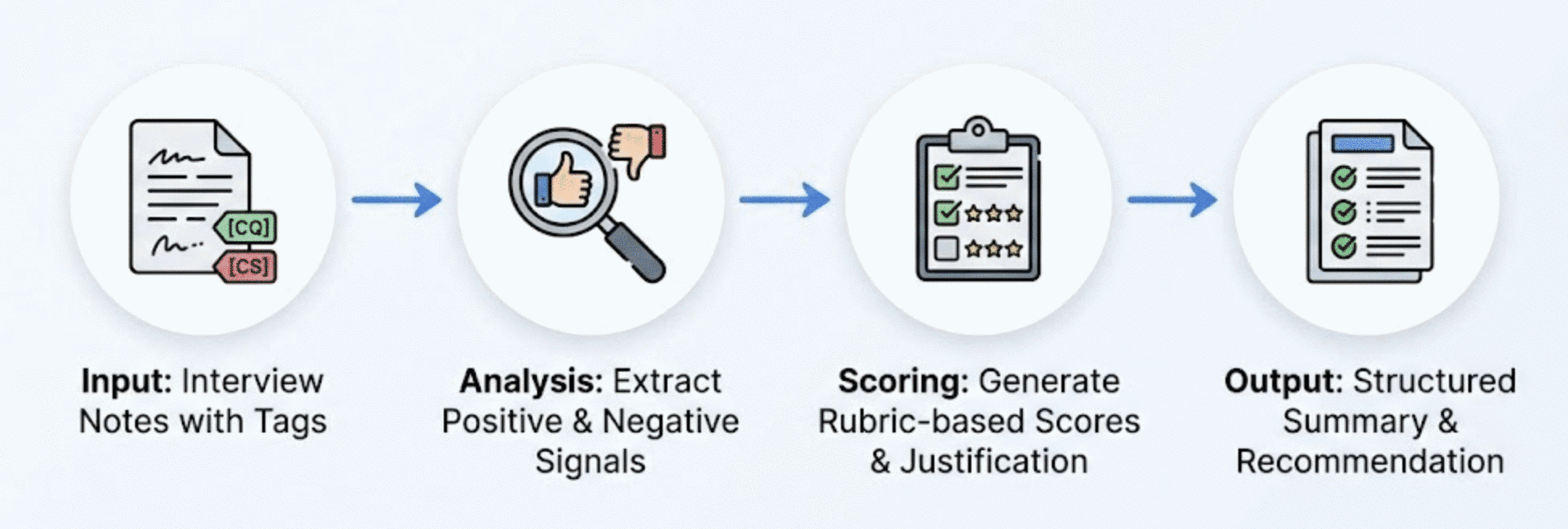
The workflow:
Input: Interview notes with tags marking interviewer prompts, candidate responses, and areas requiring clarification.
Analysis: The AI extracts positive signals (structured thinking, proactive clarification, domain expertise) and negative signals (concepts requiring explanation, confusion on fundamentals).
Scoring: Generate scores across multiple axes (Problem Solving, Domain Knowledge, Communication, Fit) with justification for each score.
Output: Structured summary with verdict, rubric scores, strengths, concerns, and clear hire/no-hire recommendation.
Scoring guidelines I use:
- 5/5: Exceptional, beyond expectations, strong hire signal
- 4/5: Strong performance, meets senior bar
- 3/5: Adequate, meets expectations
- 2/5: Below expectations, concerns identified
- 1/5: Significant gaps, strong no-hire signal
Key insights:
- An LLM-assisted summarization approach offers a number of advantages over a purely manual approach:
- Consistency: Same rubric applied systematically across all notes (and candidates)
- Completeness: No signal lost from lengthy notes
- Objectivity: Tag-based analysis reduces interpretation bias
- Actionable: Clear verdict with supporting evidence
- Structured: Easy to compare across candidates
- This tag-based approach also forces some structure onto me as the interviewer to ensure that I capture all the relevant context about the conversation.
- Tags provide a clearer way of identifying where the candidate struggled or excelled and enable effective analysis patterns:
- Tag frequency analysis reveals candidate clarity ([CQ] count)
- [CS] tags indicate knowledge gaps to probe in follow-ups
- Candidate questions to interviewer show curiosity and engagement
- Summaries are generated with a few guidelines in mind:
- Start with verdict (busy readers need bottom line first)
- Score all applicable rubric axes with justification
- Cite specific examples from notes for each assessment
- Balance strengths and concerns
- Note any axes not tested in this interview format
- The hire/no-hire (or rather proceed/don’t proceed) recommendation explicitly has to come from the interviewer and not the LLM.
Future Enhancements:
- Combine with Interview Question Generation for full interview loop
- Track rubric scores over time for interview calibration
- Provide the LLM with the job description for additional context.
📚 Documentation
Creating Reference Documentation
This use-case demonstrates creating comprehensive, reusable reference documentation for complex workflows. What we aim for here is to build a living knowledge base - the very documentation that enabled many of the other use-cases in this post.
The problem:
Oftentimes, you figure out a clever workflow, use it successfully once, and then six months later you’re staring at a blank screen trying to remember how you did it. The solution is obviously documentation, but documentation takes time — time that you don’t always have in the thick of deliverables and deadlines. Documentation, however, becomes increasingly important not just as a record for yourself but as a reference for others to learn from. This reuse and sharing of knowledge builds an institutional knowledge base that is invaluable for the organization.
The barrier to creating such documentation can be the lack of standardized approaches and platforms. Some documentation lives in Confluence, some in Google Docs, some in JIRA, some in Slack, etc. Besides just generating documentation, this workflow also aims at standardizing the generated documentation as Markdown or HTML files and storing them in plain Github repos. Documents stored in a Git repo are clearly not as interactively modifiable as Confluence or Google Docs, but they can be manipulated much more easily via LLMs (which makes them “almost” as modifiable as Google Docs).
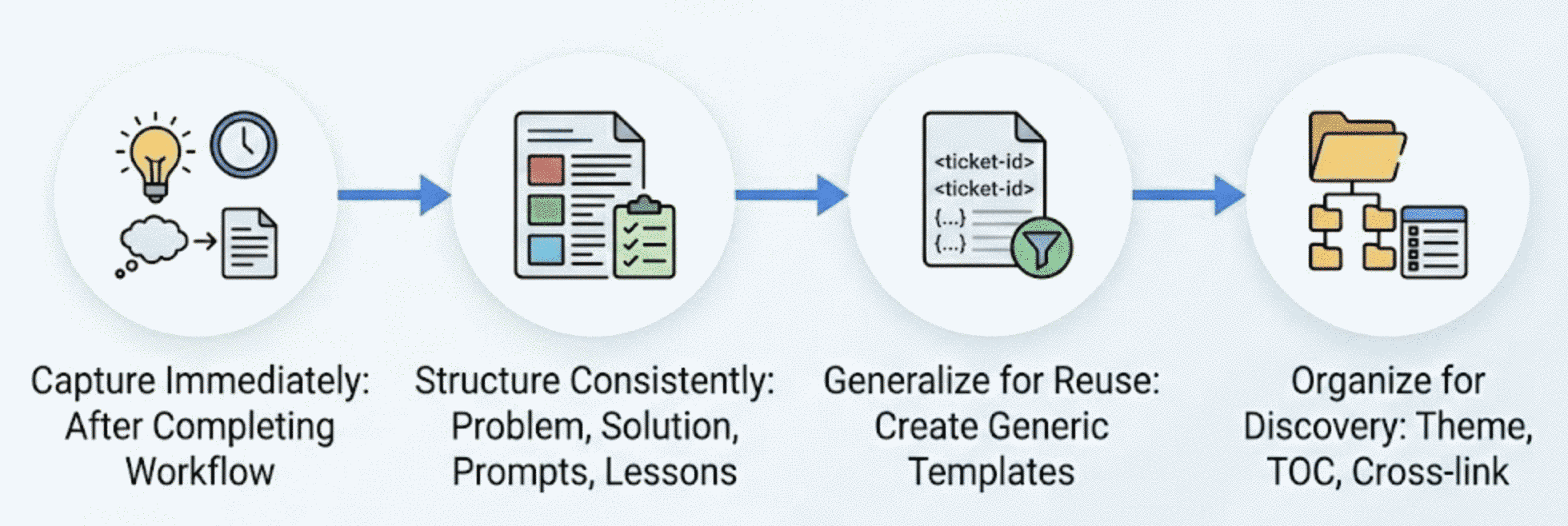
The virtuous cycle:
After completing a new experiment or workflow with MCP servers, I ask the AI assistant to update my internal reference document. The key insight is that the AI assistant that just helped you complete a task has all the context needed to document it:
- Capture immediately: Document right after completion while the conversation history contains everything
- Structure consistently: Problem statement, solution approach, example prompts, results, and lessons learned
- Generalize: Strip out commit hashes, specific ticket numbers, and names — make it a reusable template
- Organize for discovery: Group by theme, add a table of contents, and cross-link related use-cases
Example prompt:
Add this workflow to my MCP use-cases document. Include the problem
we solved, the approach we took, a generalized version of the prompt
I can reuse, and any lessons learned. Follow the existing document
structure and formatting.
Example artifacts:
- A Jira workflow reference with MCP commands, common JQL patterns, and troubleshooting tips
- This use-cases document itself (the internal version that this blog post is based on)
- Reusable templates for ticket creation, code review workflows, and status report generation
Key insights:
- Make templates generic: Replace specific values with placeholders like
<ticket-id>or<project-name> - Include the prompts: The exact wording that worked is often more valuable than the explanation
- Document failure modes: What didn’t work is as useful as what did
- Attribute AI involvement: Keep notes like “Ticket created by AI assistant” visible for transparency
Create Onboarding Guides
This use-case shows how to use Google Drive and Slack MCP integration to fetch existing documentation, messages, and links from scattered sources and synthesize comprehensive onboarding guides.
Challenges:
- Onboarding information is typically scattered across Google Docs, Confluence, wikis, and tribal knowledge
- Manual consolidation is time-consuming and error-prone
- Documents frequently become outdated without anyone noticing
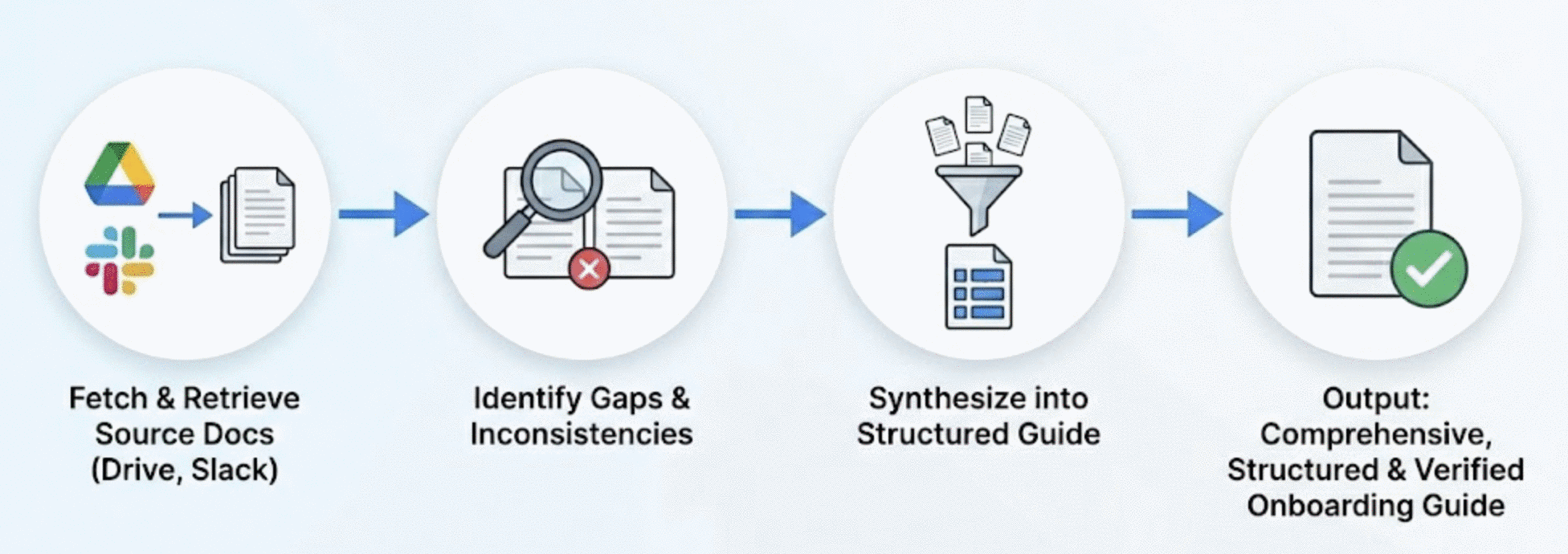
The workflow:
Fetch Source Documents: Use MCP Google Drive integration to retrieve full document content from multiple sources. The integration preserves headings, lists, and code blocks. Optionally augment this with Slack messages from the relevant channels (and the links contained therein)
Identify Gaps: Cross-reference multiple documents to find inconsistencies or missing information.
Synthesize: Combine information from multiple sources into a single, well-structured guide with consistent formatting.
Add Troubleshooting: Aggregate troubleshooting tips from scattered sources (such as Slack threads that discuss common issues) into a dedicated section.
Quality improvements:
- Consistent structure and formatting across all content
- Cross-referenced information validated for accuracy
- Comprehensive troubleshooting compiled from multiple sources
- Single source of truth that’s easier to maintain
Key insights
- Always verify that document links exist and are accessible before including them—some internal pages may be restricted or have been removed.
- Verify all information synthesized by the LLM to avoid hallucinations (this includes links added to the document, Slack handles, any reference, etc.)
The Elusive Status Update
One use-case I haven’t managed to automate with Cursor and MCP servers is the surprisingly involved use-case of providing status updates to various stakeholders. Collecting all the required context from a variety of different sources is as much work as the actual writing of the status update itself. This, however, is more a limitation of my note-taking than a limitation of Cursor and MCP servers. Currently, I mostly use the MacOS / iOS Notes app for this purpose, which does not integrate well with Cursor. To facilitate the integration with Cursor, I’ll try out the following:
- [Markdown] Move to a Markdown-based note-taking app like Obsidian or Notion
- [Structured notes] Currently, I create a new note every day. Instead, I will move to a more topic-based note-taking approach such that each project / line of work has its own note. That should enable Cursor to more easily extract the relevant context for a given topic and summarize it.
- [Tags] I already use tags quite heavily in my notes but mostly to simplify manual lookups. I expect tags to enable Cursor to more easily cross-reference notes.
- [Links] Context is often provided in various documents and Slack threads whose context is not directly imported into my notes. All these data sources should be easily available via MCP servers. One risk here is that too much context can quickly saturate the context window of the LLM (which for Opus is 200k tokens). So I’ll need to be careful with the amount of context I include in each note.
Conclusion
Even more so than just pure agentic coding assistants, MCP servers are unlocking new levels of productivity and automation for not purely coding-related tasks. Context gathering, data synthesis, report generation, people management, and so many more can be sped up to the point where non-coding tasks enjoy similar productivity gains as coding tasks. That observation is broadly in line with the findings in this Anthropic research report on how AI is transforming work at Anthropic. The flip-side of the coin is something that Anthropic engineers pointed out in that report:
“…but some employees are also concerned, paradoxically, about the atrophy of deeper skillsets required for both writing and critiquing code—‘When producing output is so easy and fast, it gets harder and harder to actually take the time to learn something.’”
I think this concern extends to all other cognitive tasks where a user now mostly verifies the output of an AI assistant rather than writing reports themselves. This transition from active participation / doing the task to passive consumption and verification reduces both the cognitive load but also the depth of understanding and learning.
It will require discipline on the part of the user to use these powerful tools as assistants to augment our own skills and facilitate learning rather than replacing and outsourcing our cognitive capabilities and side-stepping our learning process altogether.
Personally, I view all these AI tools as a way to filter, summarize, and present the most high-value information to me to speed up the process of digesting, absorbing, and learning new information. This is all in the hopes of being able to keep up with the rapid pace of information explosion in today’s world and overcoming the mostly linear data absorption abilities of our own minds. But more on the limits of human data absorption in another post.
In the meantime, keep learning!
Daniel