Project Second Brain
I’ve recently posted about automating some of my daily work that’s not directly software engineering (mostly project management-related tasks, see my Obsidian note-taking system). Besides the codification of daily workflows, the biggest outcome of that project has been the lessons learned in building knowledge bases - after all, one of the goals for my note-taking system was to build a knowledge base for all the content I consume and produce at work (daily notes, project logs, work logs, meeting/thread summaries, etc.).
As with most projects, this one also spawned a number of follow-up threads, new ideas, and questions about how to improve knowledge management and the building of knowledge bases or knowledge representations more generally:
- Are markdown files a good representation for knowledge? Most AI assistants (such as Cursor or Claude Code) use them to persist knowledge but text files seem like a crude representation of knowledge that lacks connections between different pieces of knowledge (using Wiki-style links in my Obsidian markdown files was an attempt to improve upon pure markdown files).
- Why limit the knowledge base to work-related content only? I consume so many other types of content that are spread across a number of different apps and tools (iOS Books app for academic papers, general bookmarks in Raindrop/Safari/Chrome, voice memos or podcasts in Voice Memos/Podcasts/Audiobooks apps, physical books including all the highlights and handwritten notes, etc.). All of these additional sources were not captured in my Obsidian-based note-taking workflows.
- How can I get away from an MCP server-based workflow? As much as I praised MCP servers in my previous post, I find these servers increasingly fragile in my daily use (at least when used in Cursor). I constantly have to disable/re-enable them (as they “forget” about their tools), re-authenticate them, wrestle with the limited number of tools Cursor supports (<80) to avoid filling up the context window, etc. In a recent experiment, I just replaced all MCP servers I use with a single CLI tool that provides a unified interface (via sub-CLI menus). This tool just uses httpx and REST calls to interface with all services directly instead of taking this indirect route through MCP servers. Rumor has it that this approach also suits LLMs better since they are trained on CLI tool call traces already. On a related note, Simon Willison made an observation about CLI tools in his post on Claude Skills that bears repeating:
“My own interest in MCPs has waned ever since I started taking coding agents seriously. Almost everything I might achieve with an MCP can be handled by a CLI tool instead. LLMs know how to call cli-tool –help, which means you don’t have to spend many tokens describing how to use them—the model can figure it out later when it needs to.”
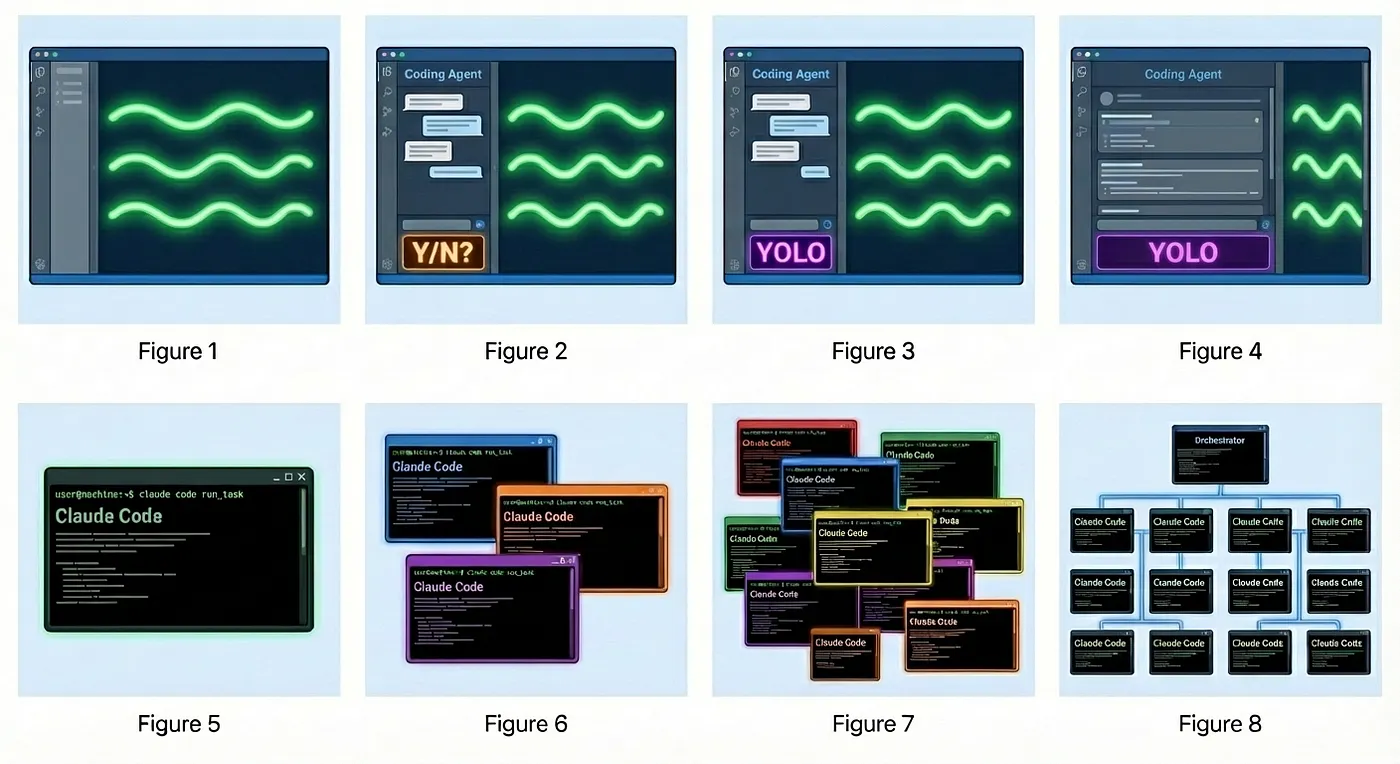
- How can I scale the note-taking workflows to ingest a large number of sources in parallel? Cursor is a great starting point for interactively launching these note-taking workflows but it is a 1-on-1 workflow in the sense that one user directs the LLM to perform one task. It does not scale to ingesting a large number of sources in parallel (e.g. summarizing multiple Slack threads, documents, etc.). If I wanted to process multiple Slack threads I always ended up queuing these requests, and Cursor processed them sequentially. In his post about Gas Town, Steve Yegge described “8 Stages of Dev Evolution To AI” that describe the types of use of AI assistants in the first four levels. The latter four levels, however, focus on increasing parallelism in the number of used agents and the number of parallel tasks being executed (see image below). While not a perfect analogy, I wanted to build a system that supported higher parallelism in ingesting content.
- How can I build a system that can operate pro-actively instead of only when prompted? My note-taking workflows are purely reactive - work only happens when I provide an input. Agentic personal AI assistant systems (like OpenClaw) though can operate pro-actively by monitoring my or other people’s actions and responding to them. I did not take OpenClaw into account when I designed my system since OpenClaw was released after I started working on my “Second Brain” project but some of its features resonated with me - in particular, its proactiveness. While not taking it as far as OpenClaw, part of “Second Brain” just monitors my activity across GitHub and Raindrop to ingest new content automatically (e.g. in response to me starring a GitHub repo).
The Origin Story
Addressing the above questions formed the origin story for my “Second Brain” project. My initial project idea was not much more than a one-pager but it formalized the idea of taking the notion of a personal knowledge base even further.
I wanted to create a system that acts as my personal knowledge base for everything — i.e., ingest all the various sources of written (and also audio) content I consume. The idea of building a personal knowledge base has been on my mind for a while, but the first time I attempted to build it was before LLM tooling was capable enough, and building a sufficiently capable system would not have been feasible given my limited time. Less than a year later, the advent of Opus 4.5 / GPT-5.2 class models made this system entirely possible. In fact, it took me less than a month to build a fairly feature-complete version of Project Second Brain. The project is described in a lot of detail in the main README file, the design docs, implementation plans, and tutorials. In this post, I just want to highlight some of the key features, observations, and lessons learned from the build process and use of “Second Brain”.
The idea of a knowledge base was part of the initial motivation. The other half was my growing concern about the limited knowledge absorption capabilities of the human mind. Ultimately, we absorb knowledge in a linear fashion (say 200 words per minute). Knowledge, though, is generated at increasingly exponential rates. So besides cataloging everything I consume, I was also looking for ways to speed up my learning — or rather, focus my learning on the highest value information. I wanted to build a learning system on top of my knowledge base that both summarizes information, extracts relevant and high-value content, and then helps me absorb that content in an efficient fashion (inspired by modern learning theory).
Overview, Architecture, and Key Features
The result of this effort is Project Second Brain — an LLM-enabled personal knowledge management and learning system. It ingests data from various sources (academic papers, online articles, blog posts, newsletters, physical books, voice notes, podcasts, code repositories, and fleeting ideas), processes them through LLM-powered pipelines, stores everything in a graph-based knowledge representation, and then helps me actively learn from that content through exercises and spaced repetition.
The guiding quote for the project captures the philosophy well:
“Tell me and I forget, teach me and I may remember, involve me and I learn.” — Xun Kuang
System Architecture
At a high level, “Second Brain” follows a pipeline architecture: data sources feed into an ingestion layer, which passes through LLM-powered processing, and ultimately lands in a knowledge hub (Obsidian), a knowledge graph (Neo4j), and a learning system — all accessible through a web application and an AI-powered learning assistant.

Key Features
“Second Brain” is built around three core capabilities:
Automated Ingestion — Diverse data source pipelines that handle PDFs (with handwriting OCR via Mistral Vision), web articles (via Raindrop.io API), physical book pages (photo → OCR → text), GitHub repositories (structure analysis + code summarization), and quick capture for fleeting ideas.
Intelligent Processing — LLM-powered summarization, key concept extraction, semantic tag classification, automatic connection discovery between notes, follow-up task generation, and exercise/quiz generation.
Active Learning — A full spaced repetition system (FSRS algorithm), AI-generated exercises (free recall, self-explanation, worked examples, code debugging, teach-back), mastery tracking, and an AI tutor that can query the knowledge graph conversationally.
Tech Stack
The system is built on a modern stack optimized for async processing, graph-based knowledge representation, and a responsive frontend:
| Component | Technology | Purpose |
|---|---|---|
| Backend |   |
Async REST API with OpenAPI docs |
| Frontend |    |
Modern, fast web interface |
| Knowledge Hub |  |
Markdown-based, local-first note storage |
| Graph DB |  |
Knowledge graph with Cypher queries |
| Relational DB |  |
Learning records, user data, scheduling |
| Cache |  |
Session state, rate limiting |
| Task Queue |  |
Async background job processing |
| LLM Interface |  |
Unified API to 100+ LLMs |
| OCR / Vision |   |
PDF processing, handwriting recognition |
| LLM Providers |   |
Summarization, exercises, assistant |
| Containerization |  |
One-command deployment |
Backend (FastAPI)
The backend is a FastAPI application that serves as the brain of the operation. It exposes REST APIs organized into six domains:
/api/ingest/*— Content ingestion (PDF, Raindrop, OCR, GitHub)/api/knowledge/*— Graph queries, search, connections, topics/api/practice/*— Exercise generation, response submission, feedback/api/review/*— Spaced repetition scheduling, due items, confidence updates/api/analytics/*— Learning curves, topic mastery, session history, weak spots/api/assistant/*— Chat interface, question generation, connection explanation
Background processing is handled by Celery workers with Redis as the message broker, enabling parallel ingestion of multiple sources without blocking the API.
Frontend (React + Vite + TailwindCSS)
The frontend is a modern React 18 application built with Vite and styled with TailwindCSS. It features a dark-themed interface optimized for focused learning and includes the following pages:
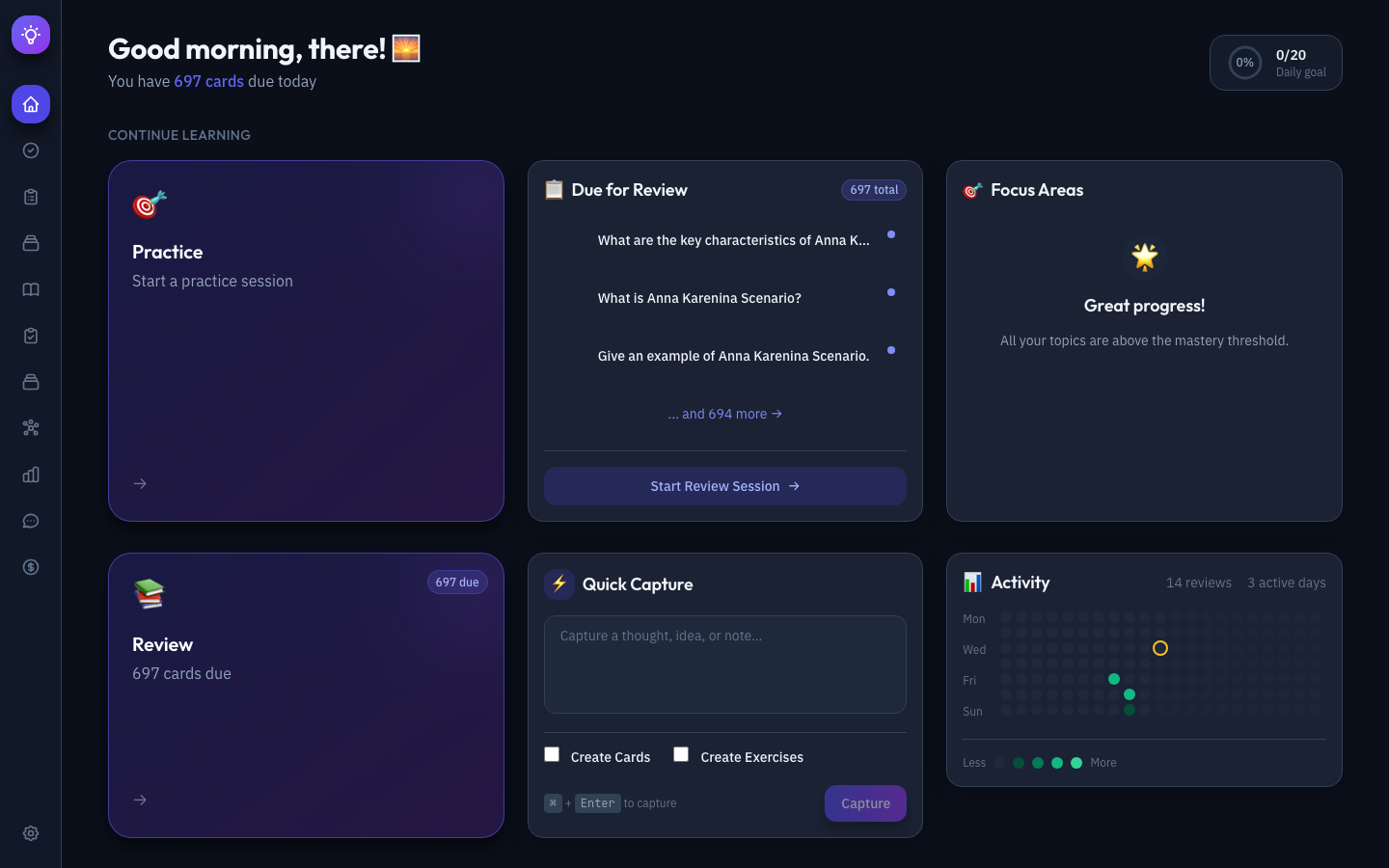
Dashboard — The home screen answers “What should I do today?” at a glance. It shows your current streak, due review cards, daily progress, quick actions, weak spots, and a quick capture input for rapidly saving ideas or URLs.
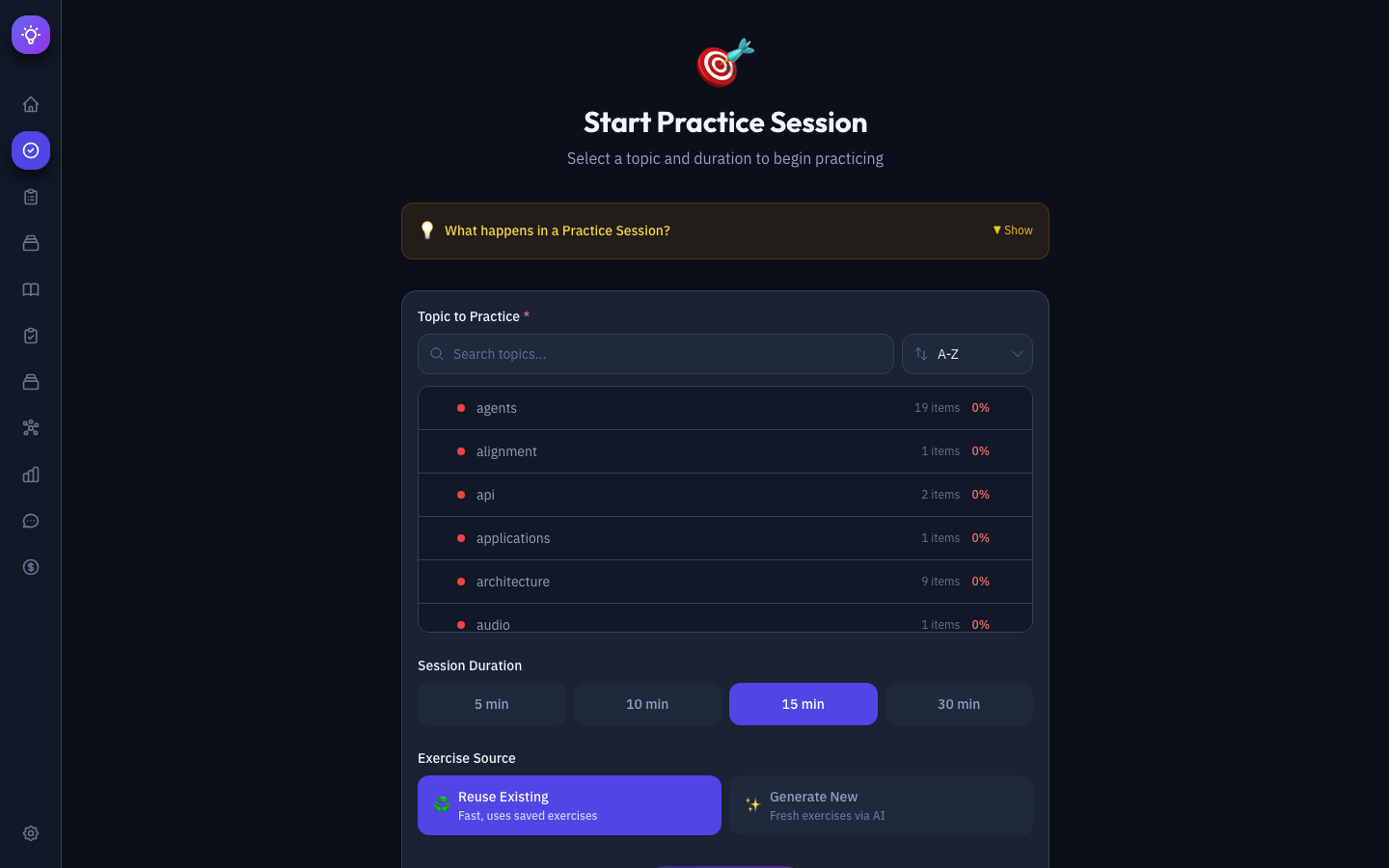
Practice Session — Enables deep learning through structured exercises grounded in cognitive science. You select topics with visual mastery indicators, configure session parameters, and practice through free recall, self-explanation, worked examples, code debugging, and teach-back prompts — all with immediate LLM-powered feedback.
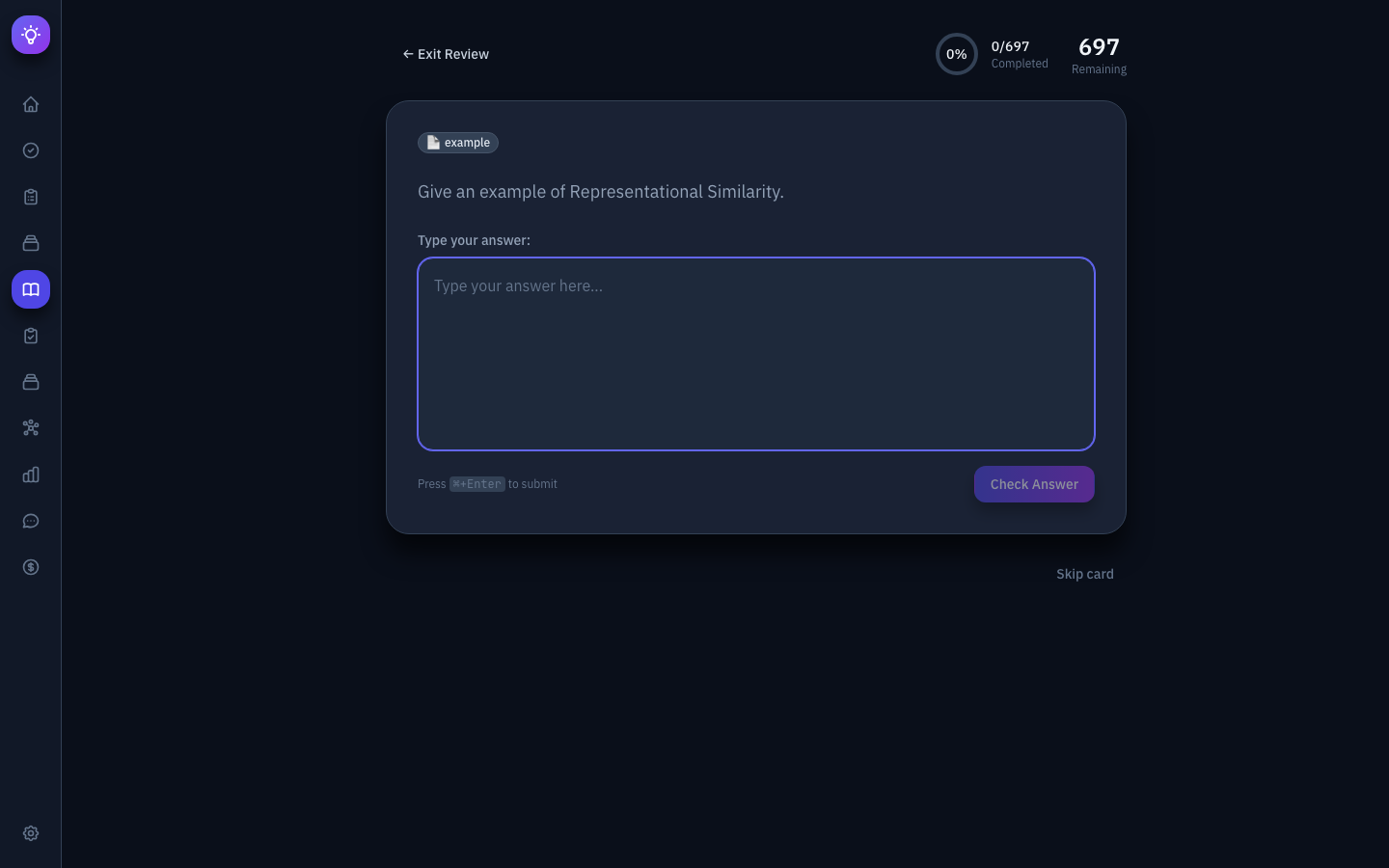
Review Queue (Spaced Repetition) — Implements the FSRS (Free Spaced Repetition Scheduler) algorithm. Cards are presented with active recall — you type your answer before seeing the correct response. The LLM evaluates answers for semantic correctness, and you rate confidence (Again/Hard/Good/Easy) to adjust scheduling.
Knowledge Explorer — A unified interface for browsing the entire Obsidian-based knowledge base. Toggle between tree and list views, search notes in real-time, use the command palette (⌘K), and render notes inline with full markdown support including syntax highlighting, LaTeX, and wiki-link navigation.
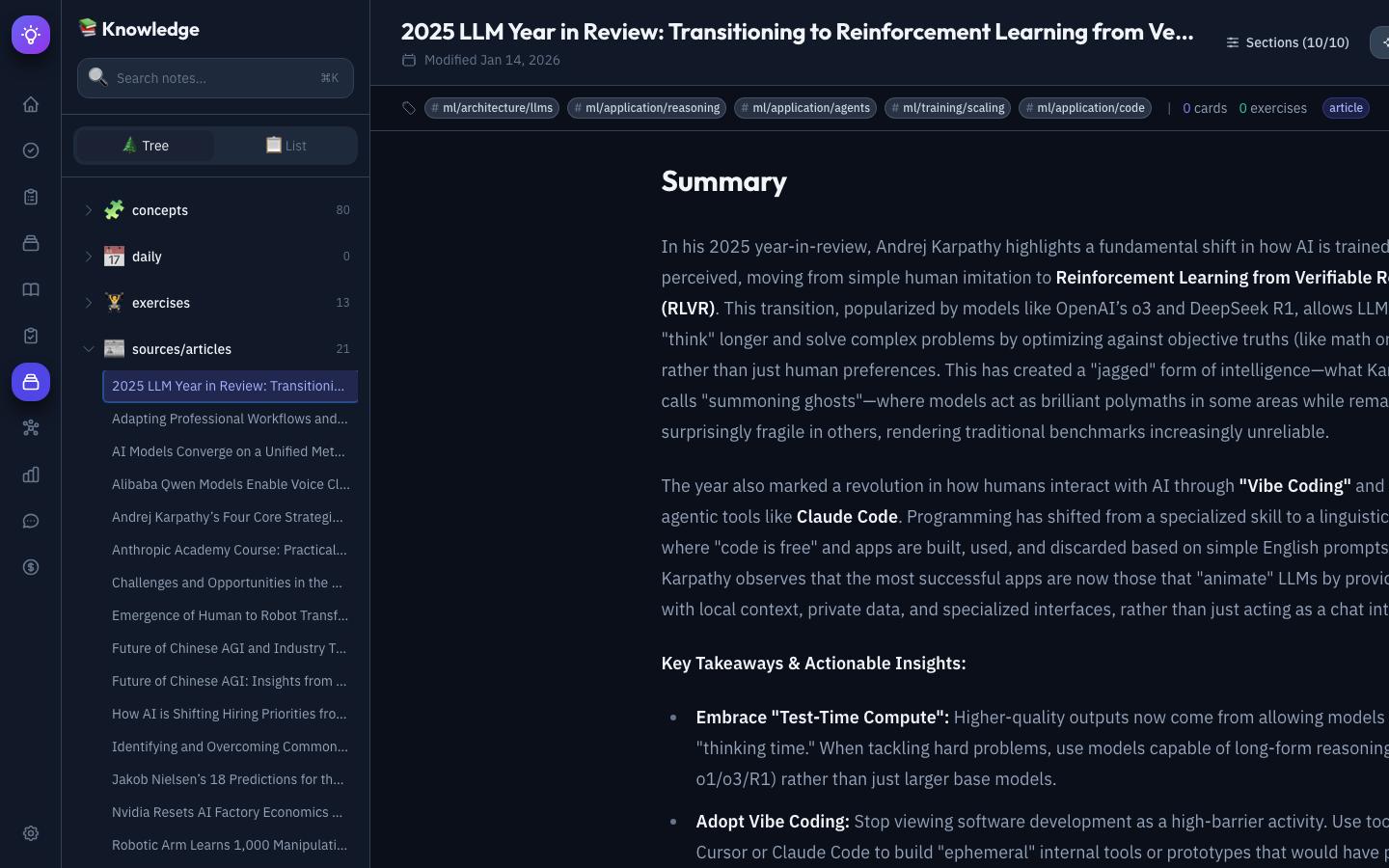
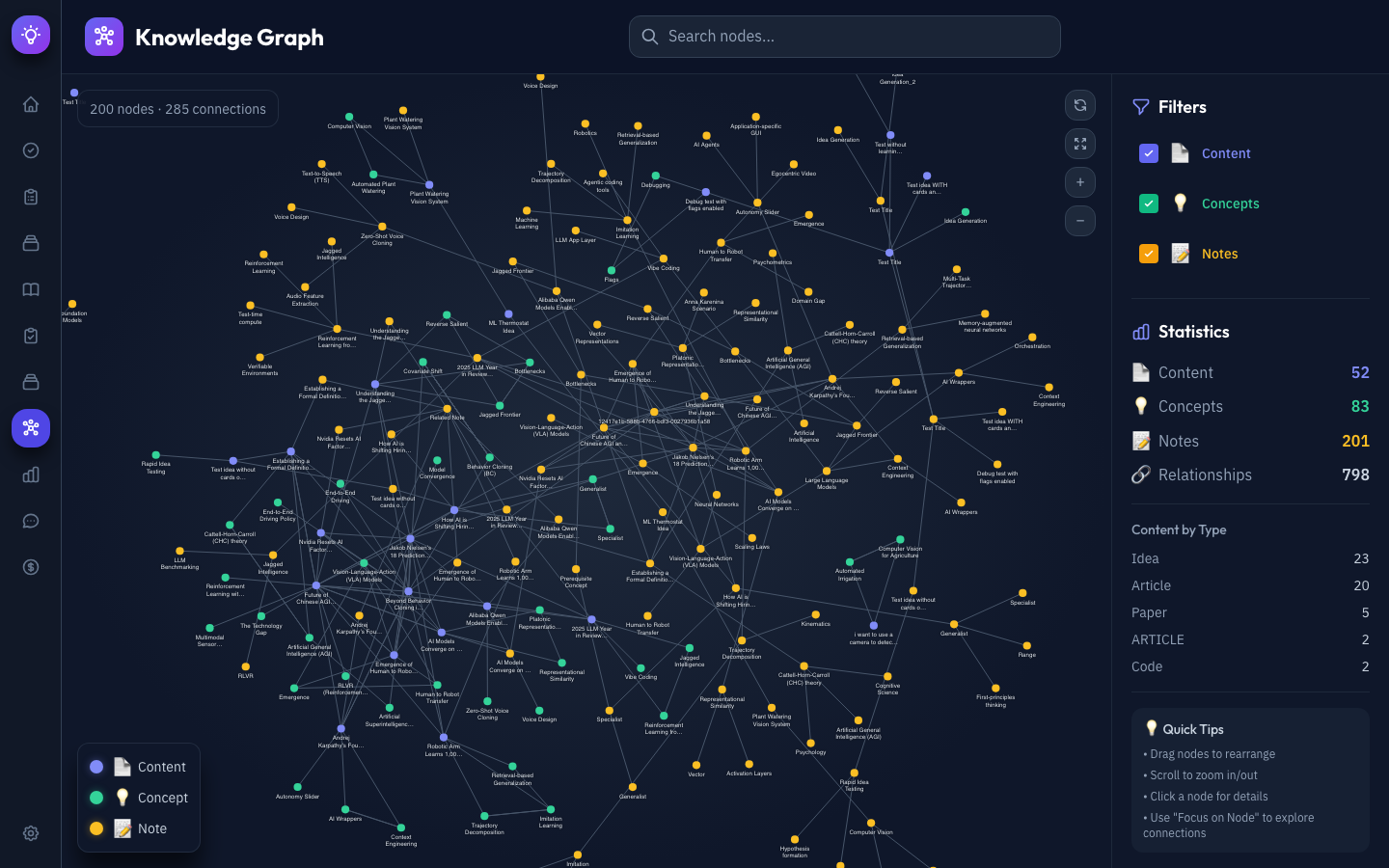
Knowledge Graph — An interactive D3.js force-directed visualization of the Neo4j knowledge graph. Different node types (Content, Concepts, Notes) are color-coded, with edges representing relationships like RELATES_TO, CITES, EXTENDS, and PREREQUISITE_FOR.
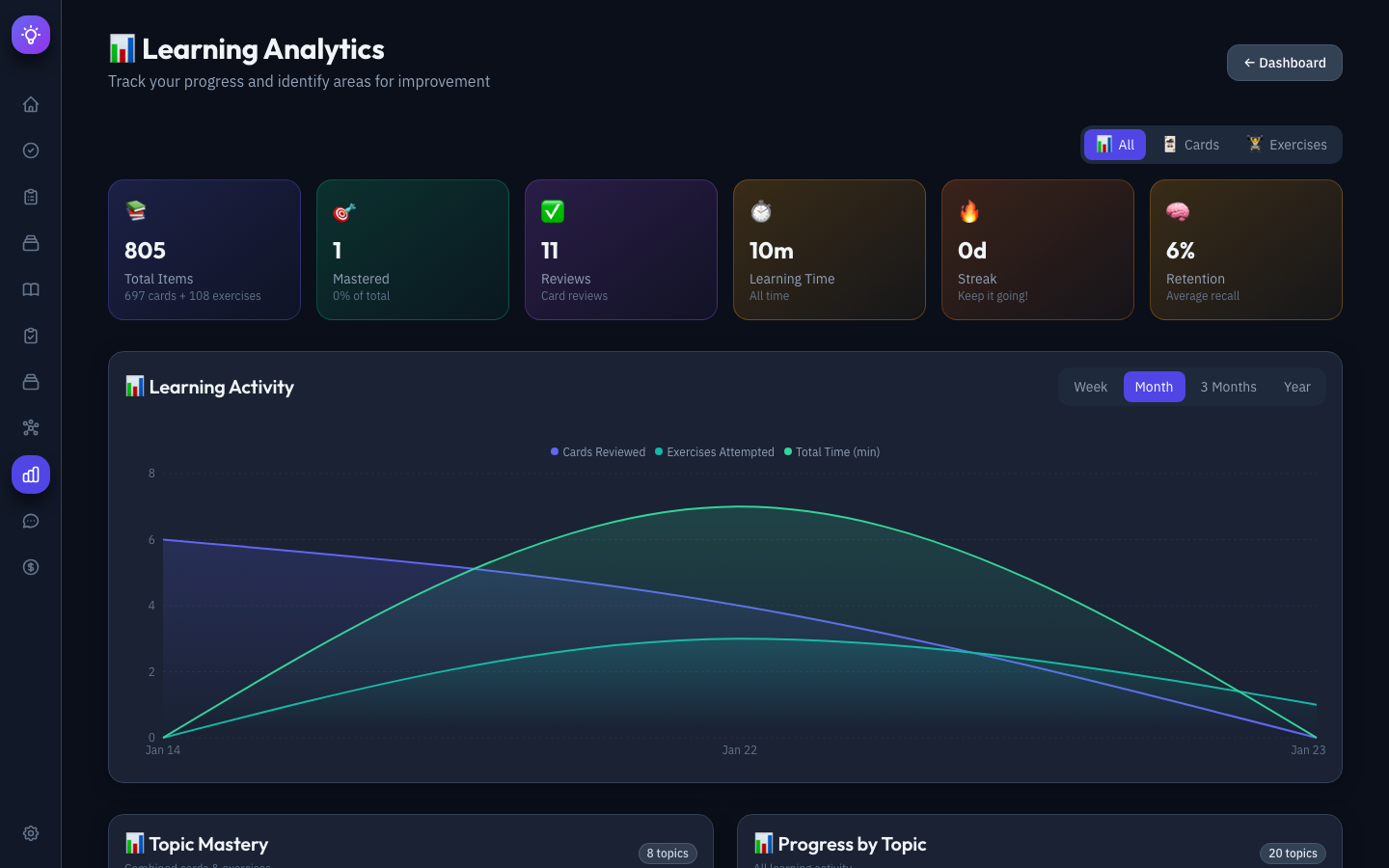
Analytics Dashboard — Comprehensive learning insights including total time invested, streak tracking, mastery percentages, activity charts over configurable time periods, topic mastery radar, and weak spots analysis with targeted “Practice Now” actions.
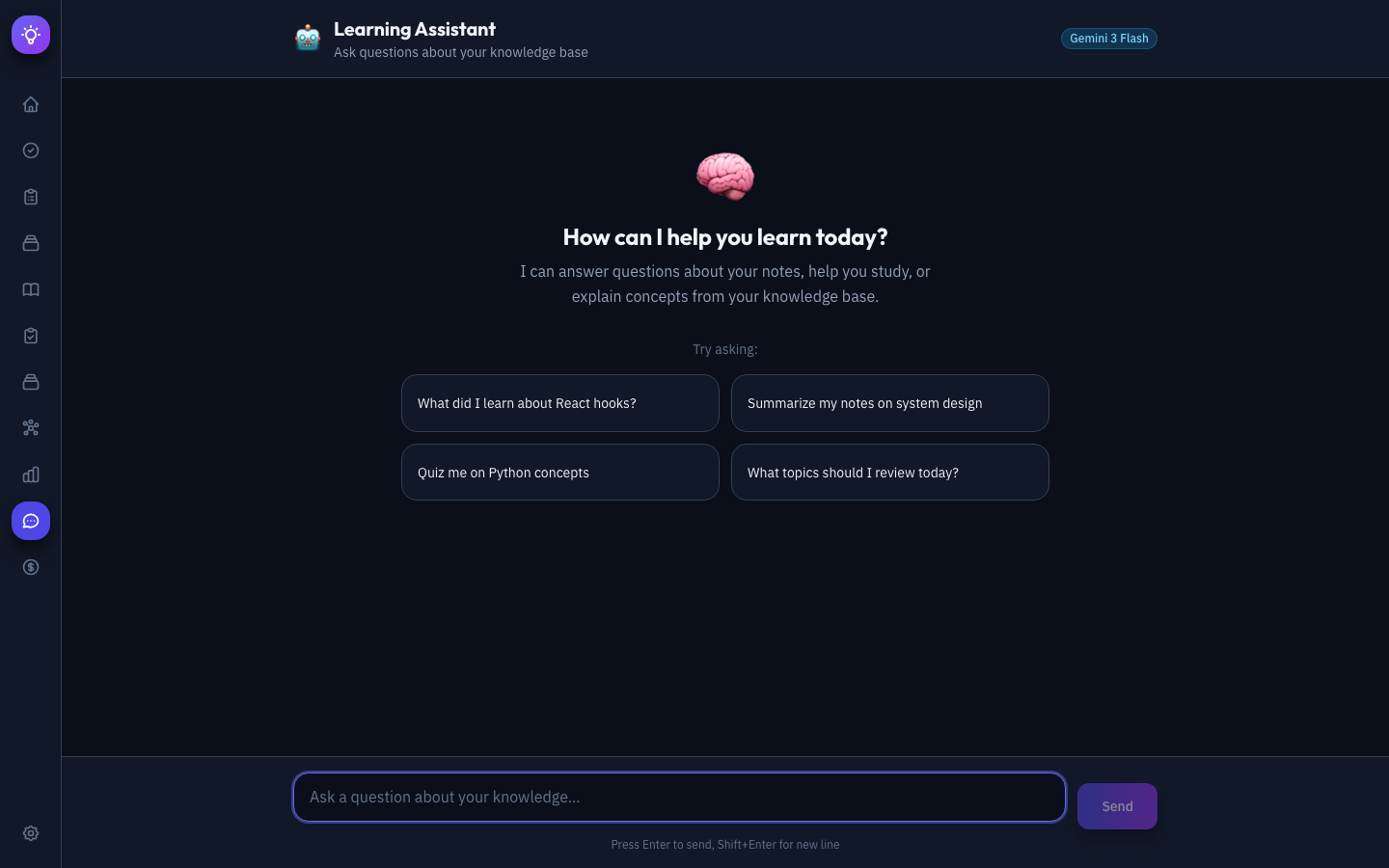
Learning Assistant — An AI-powered chat interface for conversational exploration of the knowledge base. Ask questions like “What do I know about attention mechanisms?” and the assistant searches the vault and knowledge graph, synthesizes information, and provides source citations.
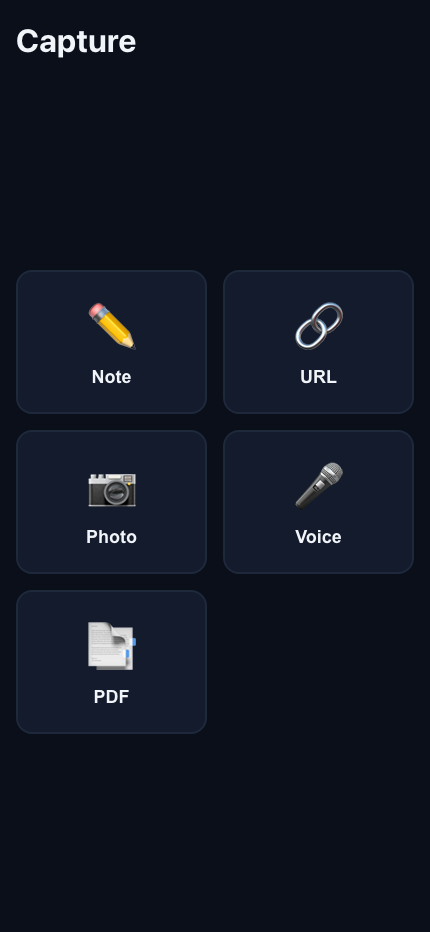
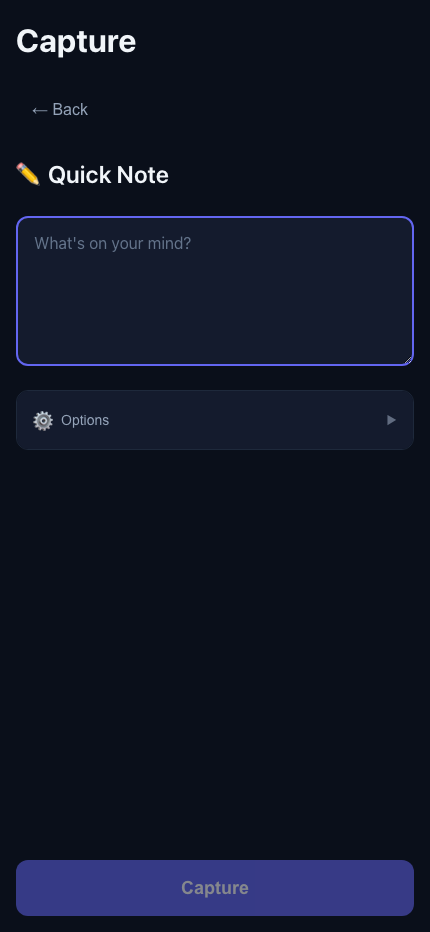
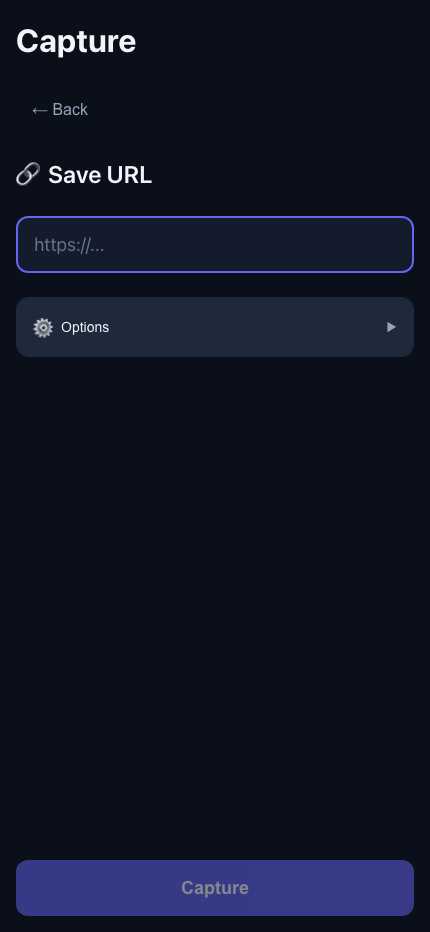
Mobile Capture (PWA)
A critical bottleneck in knowledge management is capture friction — the effort required to get information into the system. To minimize this, “Second Brain” includes a companion Progressive Web App (PWA) — a web application that can be installed on your phone and behaves like a native app. Once installed via “Add to Home Screen,” the PWA gets its own app icon, launches in a standalone window without browser, works offline via a service worker that caches assets and queues requests, and can receive shared content (URLs, text, images) from other apps through the OS share sheet. Unlike a native iOS/Android app, though, there’s no App Store submission — it’s just a lightweight frontend served from the same backend, installable in one tap.
The PWA provides a mobile-optimized interface for on-the-go capture with offline support:
| Feature | Details |
|---|---|
| Installable | “Add to Home Screen” — launches like a native app |
| Offline capable | Service worker caches assets and queues captures in IndexedDB |
| Background sync | Automatically uploads queued captures when connection is restored |
| Share target | Receive shared URLs, text, and images from other apps (Android) |
| < 3 second capture | Minimal UI with large touch targets optimized for speed |
The PWA runs as a separate lightweight frontend and communicates with the same backend API. All captures are processed asynchronously via Celery and flow into the standard ingestion pipeline.
Data Layer
The data layer is split across four storage systems, each optimized for its role:

Neo4j stores the knowledge graph with nodes for Concepts, Sources, Topics, Authors, and Tags. Edges encode relationships: RELATES_TO, CITES, CONTRADICTS, EXTENDS, and PREREQUISITE_FOR. This enables queries like “What do I know about X?” and “What connects A to B?” — powering the Graph RAG that feeds the learning assistant.
Obsidian serves as the human-readable knowledge hub. Notes are organized by content type (sources/papers/, sources/articles/, etc.) with secondary semantic tags (ml/transformers, systems/distributed) and rich bidirectional wiki-links. In practice, Obsidian and the web UI provide overlapping visualization and browsing capabilities — the web app’s Knowledge Explorer can do everything Obsidian does for reading and navigating notes. Obsidian may be deprecated as the user-facing layer in the future to avoid the overhead of keeping two data sources in sync, with the Markdown vault retained purely as a local-first storage backend.
PostgreSQL tracks all learning activity — practice attempts, confidence ratings, FSRS scheduling parameters, time invested, and mastery progression over time.
Redis handles ephemeral state — active user sessions, temporary exercise state during practice, and rate limiting for API calls.
Learning Theory Foundations
What sets “Second Brain” apart from a pure knowledge management system is its grounding in cognitive science research on learning and memory. The learning system is not just flashcards — it’s designed around evidence-based principles (see the full Learning Theory document for detailed research summaries):
| Research | Key Finding | How “Second Brain” Implements It |
|---|---|---|
| Ericsson (2008) — Deliberate Practice | Expertise requires structured practice with feedback, not passive experience | Adaptive difficulty + immediate LLM feedback on exercises |
| Bjork & Bjork (2011) — Desirable Difficulties | Spacing, interleaving, and generation enhance long-term retention | FSRS spaced repetition + varied exercise types |
| Dunlosky et al. (2013) — Learning Techniques | Practice testing and distributed practice are highest utility; highlighting/rereading are lowest | Retrieval-based exercises; avoids recognition-only tasks |
| Van Gog et al. (2011) — Cognitive Load | Worked examples before problems for novices | Adaptive: examples → testing as mastery increases |
| Chi et al. (1994) — Self-Explanation | Prompting self-explanation builds correct mental models | Self-explanation prompts embedded in exercises |
The core principles that emerge:
- Learning ≠ Performance — Easy recall during study (retrieval strength) doesn’t guarantee long-term retention (storage strength). The system optimizes for storage strength.
- Generation over Recognition — Producing answers from memory beats re-reading or highlighting. All exercises require active generation.
- Desirable Difficulties — Spacing, interleaving, testing, and variation slow immediate performance but dramatically enhance retention.
- Adaptive Scaffolding — Novices get worked examples; as mastery increases, the system shifts to retrieval practice and interleaved questioning.
Exercise types span the full cognitive spectrum:
| Content Type | Exercise Types | Difficulty Applied |
|---|---|---|
| Conceptual | Explain-in-own-words, compare/contrast, teach-back | Generation effect (no notes allowed) |
| Technical | Implement from scratch, debug code, extend functionality | Generation + Variation |
| Procedural | Reconstruct steps from memory, adapt to new scenario | Retrieval practice + Interleaving |
| Analytical | Case study analysis, predict outcomes, critique approaches | Generation + Spacing |
Observations About the Build / Design Process
Before concluding, I just want to point out a few meta-observations about the build / design process that are not strictly technical. Instead, these are more about the changing role of the software engineer in the software development process and reflect on some of the conclusions influential figures in the field have drawn about the future of software engineering:
- Steve Yegge (creator of “Gas Town” and a recent interview with the Pragmatic Engineer podcast)
- Andrej Karpathy’s tweet about “I’ve never felt this much behind as a programmer.”
- Boris Cherny’s tweet (creator of Claude Code) about “Using Claude Code”
Agentic Coding vs Vibe Coding
This project was as much about creating a usable product as it was about improving my skillset (in agentic coding, LLM-based workflows, app development, etc.). While this project was almost entirely implemented by Cursor / Claude Code, I still want to draw a distinction between vibe-coding and principled AI-assisted software development. While I let coding agents implement the entire system, the design process was highly iterative and involved and significantly more guided than the hands-off approach of vibe coding.
The limitations of vibe coding have been humorously illustrated in the “Ralph Wiggum as a”software engineer” blog post by Geoffrey Huntley — the idea that you can make coding agents work autonomously by simply running them in a loop until they achieve “complete.” Boris Cherny released a variation that learns from its mistakes, using failures as data. While these approaches kind of work, in practice, iteration without structure is just thrashing.
Instead of iterating on code directly or on vague prompts, this iterative discipline should be moved upstream: iterate on the spec until it’s well-defined, iterate on acceptance criteria until they’re testable, iterate on tests until they meaningfully constrain behavior. I tried to apply that same methodology to this project and directed Cursor to draft lengthy design and implementation plans that I iterated on multiple times before writing any code. Reading these docs consumed most of my time (not the review of the code). But given these robust design docs, I could trust the agents a lot more to get it right in one or two shots.
Iteration on Code
There were iterations on the code side as well, but I never manually corrected the code directly. I went back to the drawing board instead (i.e., design docs), updated them, and then had the agent update the implementation.

I also want to highlight the importance of good test coverage. I used unit and integration tests extensively to sanity check the codebase and catch regressions early. Any time I discovered a bug or undesired behavior, Cursor would automatically fix it and add a test to prevent it from happening again. At this point, the project has well over a thousand unit tests, hundreds of integration tests, and dozens of full end-to-end frontend tests. I would not have the confidence I have in the codebase without these tests.
Parallelization of Agents
While I had multiple agents work on the project at the same time, I managed the parallelization manually, i.e., I directed the individual agents to work on different non-overlapping parts of the project (backend vs. frontend vs. design docs). In my next project I’ll definitely leverage git trees and a much higher number of agents (maybe even Gas Town).
In terms of the “8 Stages of Dev Evolution To AI” (see image above), this was somewhere between stage 4 (still in an IDE) and stage 6 (multiple parallel agents working on different parts of the project) but still included a fair amount of code review (at least on the backend design and data model).
Backend vs Frontend
I spent most of my time getting the backend right, i.e., the data model, database structure, API endpoints, ingestion workflows, etc. In contrast, I reviewed almost none of the frontend code — mostly because a broken frontend is almost immediately noticeable. Backend and data issues, in my experience, can be more insidious and harder to diagnose.
Opus-class Models are Beasts
I knew Opus 4.5 / GPT-5.2 class models were really capable, but I was still impressed by how much coherent code they could produce. “Second Brain” has grown to over 100k lines of code and it works - using tons of unit and integration testing as a sanity check.
This impression was accompanied by a bittersweet realization of the permanently changed nature of the software engineer’s role - we’ll never go back to writing code by hand in a text editor again (Steve Yegge captures this sentiment nicely in his now one-year old post about “The death of the junior developer”).
On the other hand, I am really excited that these powerful models enable every developer (and non-developer) to build software at an order of magnitude higher velocity than ever before. We are no longer constrained by execution but only by our own creativity, imagination, and the number of ideas we can generate.
In the meantime, I’ll borrow Andrew Ng’s catchphrase here: “Keep building!”
Daniel