sequenceDiagram
    participant User as Slack User
    participant Conn as Slack Connector
    participant Orch as Orchestrator
    participant Hub as NVIDIA Inference Hub

    User->>Conn: Send message
    Conn->>Orch: Normalized event payload
    Orch->>Hub: Prompt + context
    Hub-->>Orch: Model completion
    Orch-->>Conn: Final response payload
    Conn-->>User: Reply in channel
Building Agents from Scratch — M1: Foundation
AI
Agents
Series
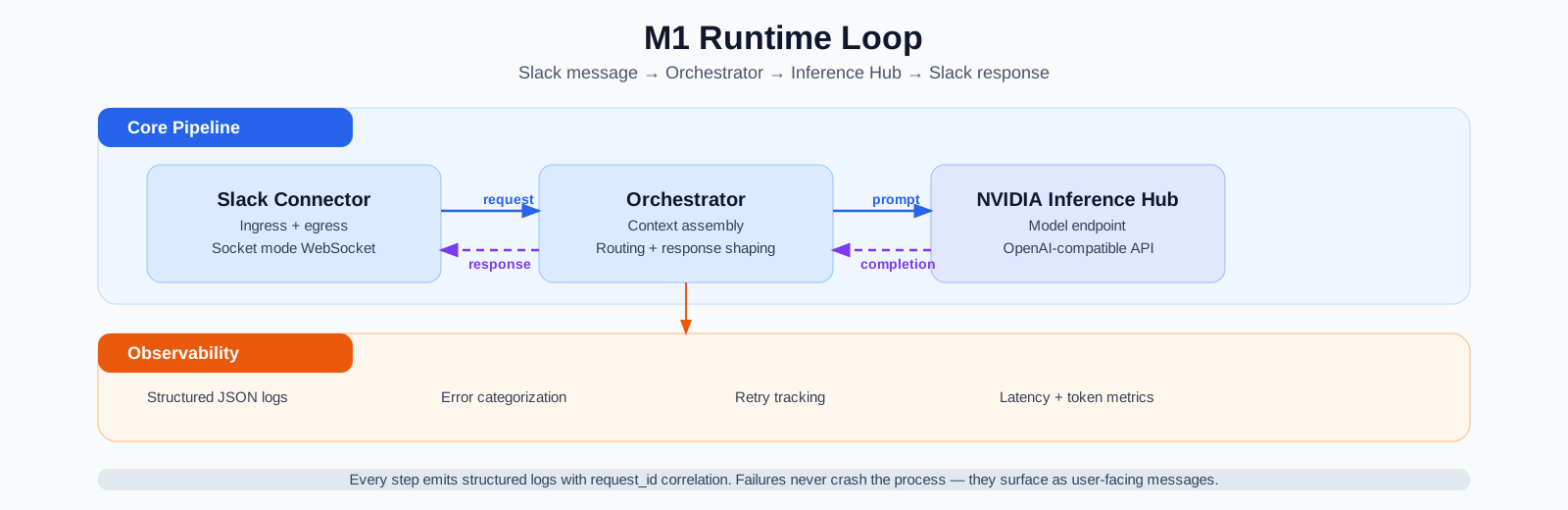
In this first post of the “Agents from scratch” series, we’ll build the core loop of our agent, which contains a way for the user to interact with the agent (via Slack), the orchestrator (which is the always-on component of the agent), and the inference backend that provides access to the brains of the system (the LLM that actually provides the reasoning power). The image below visualizes these three core components and their interaction.
While such a fairly simple system can easily run locally on the host system, I want to make sandboxing an explicit deliverable of this milestone. So even the orchestrator will run in its own sandbox isolated from the host system. In particular, I want to show how to use NVIDIA’s recently announced OpenShell as a sandboxing solution. The NemoClaw Escapades repo contains a number of deep dives for related open source projects (I recommend browsing these deep dives). One particular deep dive I want to point out is the OpenShell deep dive which goes into that package’s details. Suffice it to say for now that the reason for using OpenShell is its policy definition and enforcement mechanism which provides stronger sandbox isolation than just a pure Docker container. That, and I needed an excuse for learning the latest sandboxing technology :)
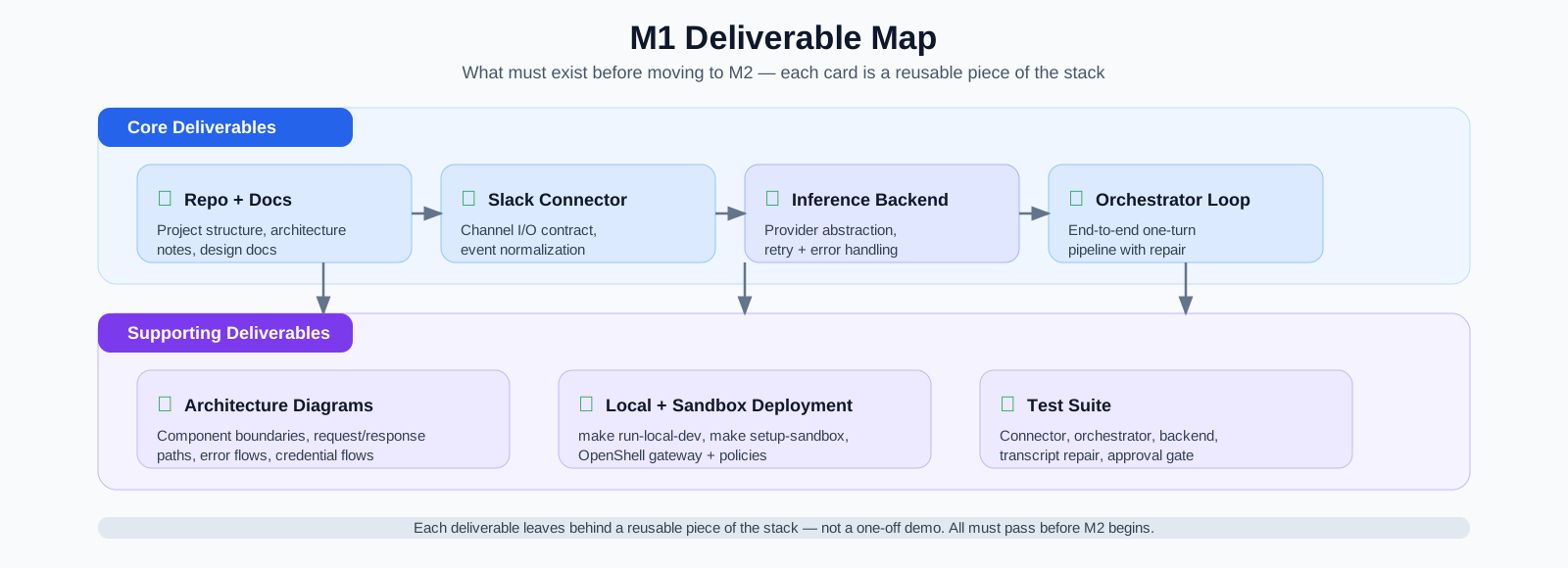
The image below summarizes the deliverables. No coding agent, memory, or tools yet — just a sandboxed chatbot that proves the core loop works end-to-end.
Why This Milestone Comes First
M1 is deliberately narrow. We are starting with the minimum viable runtime that lets us see where the core pieces of an agent system actually live — and proves they work end-to-end before anything else is layered on top.
Even though the project references NemoClaw in its broader research context, this milestone is not about deploying vanilla NemoClaw. The objective is to build and run our own orchestrator-based stack with clean, reusable, and easily understandable components. M1 just implements the bare essentials: normalize the incoming Slack event, shape the prompt, call the model through a reusable backend interface, and return a response with enough logging to debug failures. I want to build understanding, not sophistication or feature completeness at this point.
Modern agentic systems hide enormous complexity from the user and make the entire system hard to understand. What is the agent loop, the surrounding infrastructure, and the tools it may eventually call? M1 deconstructs a multi-agent system to its bare minimum — just three components to provide a minimum viable product. If this loop is not reliable, inspectable, and easy to explain, then later work on sandboxed coding agents, review loops, memory, and self-improvement will be just as inscrutable as an off-the-shelf agentic system.
What This Milestone Teaches
This milestone is meant to clarify the architecture of a minimal agent system by isolating four boundaries that every later milestone depends on.
| Boundary | Responsibility in M1 | Why isolate it now |
|---|---|---|
| Connector | Translate Slack events into internal request/response objects | Prevent channel-specific logic from leaking into the core loop |
| Orchestrator | Own context assembly, routing, retries, and response shaping | Make the “main brain” explicit from day one |
| Inference backend | Provide one interface for model calls | Keep provider choice swappable instead of hard-coded |
| Observability | Surface failures, retries, and runtime state | Make the system debuggable before it becomes more complex |
What Is an Agent, Anyway?
Before describing what M1 builds, it helps to pin down what “agent” actually means — because the term is used loosely enough to cover everything from a chatbot to a fully autonomous coding system. NVIDIA’s glossary entry on autonomous AI agents offers a useful working definition (and is overall a great introductory read): an autonomous agent is an AI system that reasons, plans, and executes multi-step tasks based on a goal, built with security, privacy, and policy controls. The key distinction from a plain chatbot is the loop: the agent observes its environment, decides what to do next, acts, and then feeds the result back into its own context for the next decision (similar to the sense-plan-act stack in robotics).
Anatomy of a General AI Agent
A practical way to use NVIDIA’s anatomy is as an implementation checklist: it breaks an agent into concrete modules that you can design, test, and evolve independently. In that sense, M1 covers roughly the agent core and some of the tools and data interfaces components.
| Component | Responsibility |
|---|---|
| LLM / agent core | The “brain” that reasons over goals, plans actions, chooses tools, and orchestrates execution under explicit guardrails and policy constraints |
| Memory modules | Preserve context across turns and tasks so the agent can adapt based on prior interactions and outcomes |
| Planning modules | Break complex objectives into steps, either as a one-pass decomposition (for example chain/tree-of-thought style planning) or iteratively with feedback loops (for example ReAct, Reflexion, or human-in-the-loop refinement) |
| Tools and data interfaces | Extend capability beyond text generation through APIs (actions), databases, and RAG pipelines (retrieval and grounding) |
| Systems of models | Combine different model classes to balance quality, latency, cost, and data/security constraints instead of relying on one model for every subtask |
This framing makes the chatbot vs agent distinction clearer: a chatbot can generate responses, but an agent has explicit modules for planning, memory, and action, and runs an observe-decide-act loop constrained by policy (to, among other things, enable multi-step tasks and reasoning).
Coding Agents as a Specialized Subtype
Coding agents are one important subtype of this broader pattern. They inherit the same anatomy above, but apply it to software development tasks and add code-specific infrastructure. Sebastian Raschka’s Components of a Coding Agent provides a practical decomposition of that specialized harness and contains six core building blocks:
| Coding-agent component | Role | Maps to general anatomy |
|---|---|---|
| Live repo context | Gather workspace facts (branch, project layout, instructions) before making changes | Memory modules + Tools and data interfaces |
| Prompt shape and cache reuse | Keep stable context reusable and append only turn-specific deltas | LLM / agent core + Memory modules |
| Structured tools and permissions | Expose explicit actions (read/edit/run) with validation and approval controls | Tools and data interfaces + LLM / agent core (guardrails/policy) |
| Context reduction | Keep long sessions within context limits by clipping and compressing history | Memory modules |
| Structured session memory | Maintain transcript and working memory for continuity across turns | Memory modules |
| Bounded subagents | Delegate subtasks to child agents with tighter permissions and scope | Planning modules + Systems of models |
M1 deliberately focuses on the foundation that general agents and coding agents both need: the core loop (connector + orchestrator + inference backend), clear interfaces, and observability. Rich memory, iterative planning, coding abilities, and tooling depth are layered on in later milestones.
Deployment Model
In this milestone, I also establish the first deployment split for the system: the orchestrator and Slack connector run locally (with or without a sandbox), while model inference is hosted remotely through NVIDIA Inference Hub:
- Running the control loop locally keeps the architecture easy to inspect, iterate on, and debug.
- Using hosted inference avoids premature model-serving work while still forcing a real backend abstraction.
- Keeping the boundary explicit gives us a cleaner path toward later always-on deployment on managed infrastructure rather than trapping the project in a laptop-only demo.
Regardless of where components are hosted, this milestone makes an explicit effort to sandbox each component such that I can easily move them from a local machine to hosted infrastructure. In other words, the actual deployment mode should be transparent to the user.
Architecture Flow
The interaction loop between the user and the agent is kept simple:
- A Slack user sends a message.
- The connector converts that platform event into a normalized payload.
- The orchestrator builds the prompt context and decides how to call the model.
- The inference backend sends that request to NVIDIA Inference Hub (or any other OpenAI-compatible API).
- The orchestrator shapes the result into a final response and returns it through the connector to the user.
This setup enables multi-turn conversations and provides chatbot-like functionality. It does not provide any tool calls or memory at this point but it gives us a working baseline for control flow, abstraction boundaries, and deployment.
Setup
Project Housekeeping
Use of Makefiles
I have come full-circle regarding the use of Makefiles. Early on in my career at Apple, the era of Makefiles just ended as we transitioned to CMake and to Bazel shortly after. While Bazel is an excellent build toolchain for large distributed projects, I find it overpowered for small (hobby) projects (like Second Brain or Nemoclaw Escapades). For that scale, I have really come to like Makefiles - nothing says convenience like “make install” and “make run” to bring a project to life.
Documentation chain
This project is based on the main design file in design.md. Before implementing a milestone, though, I create a milestone-specific design file that contains sufficient details for implementation. Based on this sub-design document and the actual implementation, I write the corresponding blog post. So the chain of events that unfolds is the following: design.md -> design_m1.md -> code -> m1_setting_up_nemoclaw.md
Supported platforms
I am developing this project on macOS. In principle, this code should be able to run on Linux as well (given the sandboxed nature of OpenShell) but I have not tested nor do I make any guarantees of interoperability.
Common Setup
This guide takes you from a fresh repo clone to a fully working Slack bot. It is split into four parts — two setup phases and two run options. If you want to deploy the agent locally without sandboxing, you can skip the OpenShell setup. Given the central nature of OpenShell as a policy enforcement and deployment mechanism, I strongly recommend getting familiar with it — it will enable powerful use-cases down the road.
| Phase | Steps | What it covers |
|---|---|---|
| Common setup | 1–5 | Credentials and dependencies needed for both deployment options |
| OpenShell sandbox setup | 6–10 | Gateway, providers, inference routing, and network policy (skip if running locally only) |
| Running locally | 11–12 | The fastest path: run the bot directly on your machine |
| Running in an OpenShell sandbox | 13–15 | Build, deploy, verify, and debug the sandboxed bot |
Complete Steps 1–5 first. If you also want sandboxed deployment, continue with Steps 6–10. Then run the bot locally (Steps 11–12), in the sandbox (Steps 13–15), or both.
Prerequisites
| Requirement | Version | Check |
|---|---|---|
| Python | 3.11+ | python3 --version |
| Docker Desktop | Running | docker info |
| OpenShell CLI | 0.0.21+ | openshell --version |
| A Slack workspace | You have admin access or can create apps | — |
| An NVIDIA account | For Inference Hub API keys | build.nvidia.com |
Note on model availability: build.nvidia.com is the public developer portal where you browse models and create API keys. The portal only displays open-weight models (Llama, Nemotron, Qwen, etc.), but the API behind it appears to serve a much larger catalog — including closed-source models like Claude, GPT, and Gemini — depending on your account. The model name in your config (e.g.
azure/anthropic/claude-opus-4-6) must match what the endpoint actually serves; queryhttps://inference-api.nvidia.com/v1/modelswith your API key to see what’s available to you. Any OpenAI-compatible inference provider works with this project — setINFERENCE_HUB_BASE_URLandINFERENCE_HUB_API_KEYin your.envto point at the provider of your choice (e.g. OpenRouter, a self-hosted vLLM instance, or the NVIDIA endpoint).
Step 1: Create a Slack App
You need two tokens: a bot token (xoxb-...) for API calls and an app-level token (xapp-...) for Socket Mode.
- Go to api.slack.com/apps and click Create New App → From scratch.
- Name it (e.g.
dbot), pick your workspace, and create it.
Enable Socket Mode
Socket Mode lets the bot receive events over a WebSocket instead of requiring a public HTTP endpoint. This is critical for local development and for running inside an OpenShell sandbox (which only allows outbound connections).
- In the left sidebar, click Socket Mode.
- Toggle Enable Socket Mode on.
- When prompted, create an app-level token. Name it
socket-modeand give it theconnections:writescope. - Copy the token (
xapp-...). This is yourSLACK_APP_TOKEN.
Configure Bot Scopes
- Go to OAuth & Permissions in the sidebar.
- Under Bot Token Scopes, add:
app_mentions:read— see @mentionschat:write— send messagesim:history— read DM historyim:read— see DM metadataim:write— open DMschannels:history— read channel history (for threaded replies)
Subscribe to Events
- Go to Event Subscriptions in the sidebar.
- Toggle Enable Events on.
- Under Subscribe to bot events, add:
message.im— DM messagesmessage.channels— channel messages (optional, for @mention responses)app_mention— @bot mentions
Install to Workspace
- Go to Install App in the sidebar.
- Click Install to Workspace and authorize.
- Copy the Bot User OAuth Token (
xoxb-...). This is yourSLACK_BOT_TOKEN.
Step 2: Get an NVIDIA Inference Hub API Key
- Go to build.nvidia.com and sign in.
- Pick a model endpoint (e.g. search for “claude” or any available model).
- Click Get API Key or navigate to your API keys page.
- Create a key and copy it. This is your
INFERENCE_HUB_API_KEY. - Note the model name — the exact string the API expects (e.g.
azure/anthropic/claude-opus-4-6). Hyphens vs dots matter.
Step 3: Clone and Configure
git clone https://github.com/dpickem/nemoclaw_escapades.git
cd nemoclaw_escapades
cp .env.example .env
Edit .env and fill in the three required values:
SLACK_BOT_TOKEN=xoxb-your-token-here
SLACK_APP_TOKEN=xapp-your-token-here
INFERENCE_HUB_API_KEY=your-nvidia-api-key-here
INFERENCE_HUB_BASE_URL=https://your-inference-endpoint/v1
Step 4: Install Dependencies
make installThis runs pip install -e ".[dev]", installing the project and all development dependencies (pytest, ruff, mypy, etc.).
Step 5: Verify Credentials
make test-authThis script tests each credential against its API:
SLACK_BOT_TOKEN→ callsauth.teston the Slack APISLACK_APP_TOKEN→ callsapps.connections.openINFERENCE_HUB_API_KEY→ calls/v1/modelsand/v1/chat/completionson the inference API
All four checks should show ✓. If inference fails, check the model name.
OpenShell Sandbox Setup
If you want to run the bot inside a policy-enforced OpenShell sandbox (rather than just on your bare-metal local host), complete these additional setup steps. You need to configure the gateway, register credential providers, set up inference routing, and understand the network policy.
Step 6: Start the OpenShell Gateway
openshell gateway startThis downloads and starts a k3s cluster inside Docker Desktop. In this guide, the gateway runs locally on your laptop — but OpenShell also supports remote gateways (via SSH to a Linux host, a Brev cloud GPU instance, or a DGX Spark) and cloud gateways (behind a reverse proxy). The same CLI, policies, and sandbox definitions work identically regardless of where the gateway runs; only the transport changes. For details, see the OpenShell deep dive section on remote hosting.
First run downloads the gateway image (~200 MB) and initializes the cluster. Expect 1-2 minutes. Subsequent starts reuse the existing cluster and take seconds.
Verify the gateway is healthy:
openshell statusExpected output:
Server Status
  Gateway: openshell
  Server: https://127.0.0.1:8080
  Status: Connected
  Version: 0.0.21
If you see connection refused, the gateway container is likely stopped (e.g. after a reboot or Docker Desktop restart). As of OpenShell v0.0.21, openshell gateway start cannot restart a stopped gateway — it only asks “Destroy and recreate?”, which re-downloads the image. Instead, restart the container directly:
make setup-gateway        # detects stopped container and restarts it
openshell status          # should now show "Connected"
make setup-gateway handles this automatically: it tries docker start on the existing container, waits for k3s to initialize, and only falls back to a fresh openshell gateway start when no container exists at all. If you see “Connection reset by peer” instead of “Connected”, wait a few more seconds and retry — the gateway is starting but k3s isn’t ready yet. See Lesson #18 for the full breakdown of this limitation.
Understanding the gateway
The gateway is the central control plane. It:
- Runs k3s (lightweight Kubernetes) inside a Docker container
- Manages sandbox pods (create, delete, monitor)
- Stores provider credentials (encrypted, never exposed to sandboxes)
- Runs the HTTPS proxy that mediates all sandbox network traffic
- Hosts the
inference.localinference routing proxy
Everything below depends on the gateway running. If it dies, all sandboxes lose connectivity. In that sense, the gateway is the central point of failure for this entire system (the same is true for the orchestrator).
Step 7: Register the Inference Provider
OpenShell has a provider abstraction for managing credentials. You register a provider once, and it can be attached to any number of sandboxes.
openshell provider create \
    --name inference-hub \
    --type openai \
    --credential "OPENAI_API_KEY=$(grep INFERENCE_HUB_API_KEY .env | cut -d= -f2-)" \
    --config "OPENAI_BASE_URL=$(grep INFERENCE_HUB_BASE_URL .env | cut -d= -f2-)"
Let’s break this down:
--name inference-hub: A logical name we’ll reference later.--type openai: The provider type. We useopenaibecause our inference endpoint exposes an OpenAI-compatible API (/v1/chat/completions). Other types:nvidia,anthropic,claude,generic.--credential "OPENAI_API_KEY=...": The API key. The nameOPENAI_API_KEYis required by theopenaiprovider type — it’s the env var name OpenShell uses internally for routing. The actual value comes from your.envfile.--config "OPENAI_BASE_URL=...": The upstream endpoint. Without this, theopenaitype defaults toapi.openai.com. We override it to point to the endpoint configured inINFERENCE_HUB_BASE_URL.
Why not --type nvidia? The nvidia type defaults to integrate.api.nvidia.com, which may not match your endpoint. See Lesson #10 for a full comparison.
Why not --type generic? The generic type works for credential injection via placeholders, but it cannot be used with openshell inference set (the inference routing command). Only openai, nvidia, and anthropic types support inference routing.
If the provider already exists, you’ll see an error. Use openshell provider delete inference-hub first, or ignore the error.
Shortcut:
make setup-secretsruns Steps 7–9 (inference provider, inference routing, and Slack provider) in one command.
Persistence note: Provider registrations are stored in a Docker volume on the gateway host. They survive gateway restarts via
docker startbut are lost if you destroy and recreate the gateway (openshell gateway start --recreateor answeringYto “Destroy and recreate?”). After a recreate, re-run this step and Steps 8–9 (or justmake setup-secrets).
Verify the provider:
openshell provider get inference-hubExpected:
Provider:
  Name: inference-hub
  Type: openai
  Credential keys: OPENAI_API_KEY
  Config keys: OPENAI_BASE_URL
Step 8: Configure Inference Routing
Registering a provider only stores the credential. You must also tell the gateway how to route inference requests from inference.local to the real upstream:
openshell inference set \
    --provider inference-hub \
    --model "${INFERENCE_MODEL:-azure/anthropic/claude-opus-4-6}" \
    --no-verify
The --no-verify flag skips the endpoint reachability test during setup (useful if your network blocks the probe). The INFERENCE_MODEL env var lets you override the model without editing the command; it defaults to azure/anthropic/claude-opus-4-6.
This configures the inference.local proxy endpoint inside sandboxes:
sequenceDiagram
    participant App as Sandbox App
    participant Proxy as inference.local Proxy
    participant Hub as Upstream Endpoint

    App->>Proxy: POST /v1/chat/completions (no Authorization header)
    Note over Proxy: Look up provider "inference-hub"
    Note over Proxy: Add Authorization: Bearer <real-api-key>
    Note over Proxy: Override model → configured model name
    Proxy->>Hub: POST /v1/chat/completions (real key + forced model)
    Hub-->>Proxy: Model completion
    Proxy-->>App: Response (unchanged)
The --model flag forces the model name. This is important: the proxy overrides whatever model the app requests. If this name doesn’t exactly match what the upstream API expects, you’ll get 401 errors. The model name is claude-opus-4-6 (hyphenated), NOT claude-opus-4.6 (dotted).
Verify routing:
openshell inference getExpected:
Gateway inference:

  Provider: inference-hub
  Model: azure/anthropic/claude-opus-4-6
  Version: 1
  Timeout: 60s (default)

System inference:

  Not configured
If you omit --no-verify, the command will test the endpoint and report whether it’s reachable.
Shortcut: This step is included in
make setup-secrets(along with Steps 7 and 9).
Persistence note: Like providers, inference routing config is stored in the gateway’s Docker volume. It persists across
docker startrestarts but is lost on a gateway recreate.
Step 9: Register the Slack Provider
Slack credentials use the generic provider type because OpenShell doesn’t have a built-in Slack type. The generic type lets us define arbitrary env var names:
openshell provider create \
    --name slack-credentials \
    --type generic \
    --credential "SLACK_BOT_TOKEN=$(grep SLACK_BOT_TOKEN .env | cut -d= -f2-)" \
    --credential "SLACK_APP_TOKEN=$(grep SLACK_APP_TOKEN .env | cut -d= -f2-)"
Inside the sandbox, these become env vars with placeholder values:
SLACK_BOT_TOKEN=openshell:resolve:env:SLACK_BOT_TOKEN
SLACK_APP_TOKEN=openshell:resolve:env:SLACK_APP_TOKEN
The HTTPS proxy resolves these placeholders to the real tokens when the Slack SDK makes HTTP requests with Authorization: Bearer <placeholder>.
These HTTP credentials also cover Slack’s Socket Mode (WebSocket) — see Lesson #19 for how.
Shortcut: make setup-secrets runs all three commands (inference provider, inference routing, Slack provider) in one step.
Step 10: Understand the Sandbox Network Policy
Before deploying, it’s worth understanding what the sandbox is and isn’t allowed to do. The policy lives in policies/orchestrator.yaml. For reference, see the NemoClaw reference policy (the upstream example our policy is based on) and the OpenShell policy documentation.
The network policy has three entries, each using a different proxy mode depending on what the traffic needs:
| Policy entry | Destination | Proxy mode | Why |
|---|---|---|---|
slack_api |
slack.com |
protocol: rest, tls: terminate |
Credential placeholder resolution in HTTP headers |
slack_websocket |
*.slack.com |
access: full (CONNECT tunnel) |
Long-lived WebSocket; no header inspection needed |
inference |
inference.local |
protocol: rest, tls: terminate |
API key injection + model name override |
slack_api — For Slack HTTP API calls (auth.test, chat.postMessage, apps.connections.open):
endpoints:
  - host: slack.com
    port: 443
    protocol: rest
    enforcement: enforce
    tls: terminate
    rules:
      - allow: { method: GET, path: "/**" }
      - allow: { method: POST, path: "/**" }
protocol: rest + tls: terminate means the proxy intercepts HTTPS traffic, terminates TLS, inspects HTTP headers (resolving credential placeholders), and enforces method/path rules.
slack_websocket — For the Socket Mode WebSocket connection:
endpoints:
  - host: "*.slack.com"
    port: 443
    access: full
access: full creates a CONNECT tunnel — opaque TCP passthrough with no header inspection. This is necessary because Socket Mode is a long-lived WebSocket that the proxy’s HTTP idle timeout (~2 min) would kill. See Lesson #19 for the full two-phase authentication flow and why Slack needs both entries.
inference — For model inference via the built-in proxy:
endpoints:
  - host: inference.local
    port: 443
    protocol: rest
    enforcement: enforce
    tls: terminate
    rules:
      - allow: { method: GET, path: "/**" }
      - allow: { method: POST, path: "/**" }
Note this is inference.local, not the upstream endpoint directly. The app sends requests to inference.local; the inference routing proxy handles forwarding to the real upstream. Direct access to external inference endpoints is blocked by the proxy (Python’s HTTP libraries use CONNECT tunneling, which the proxy rejects for protocol: rest endpoints — see Lesson #8 below).
The rules restrict the endpoint to GET and POST only. These are the only HTTP methods the OpenAI-compatible inference API uses: POST for /v1/chat/completions (the actual inference call) and GET for /v1/models (listing available models). Methods like PUT, DELETE, and PATCH are blocked because the inference API has no endpoints that use them — allowing them would widen the attack surface for no benefit. This is the principle of least privilege applied at the HTTP method level: only permit what the application actually needs.
Running the Bot
Running Locally
This is the fastest way to see the bot in action. No Docker, no sandbox — just a Python process on your machine talking to Slack and NVIDIA Inference Hub.
Step 11: Run Locally
make run-local-devYou should see:
{"level": "INFO", "component": "main", "message": "Starting NemoClaw M1 agent loop"}
{"level": "INFO", "component": "slack_connector", "message": "Slack bot authenticated"}
{"level": "INFO", "component": "slack_bolt.AsyncApp", "message": "⚡️ Bolt app is running!"}
Test the bot in two ways:
DMs: Click the + next to “Direct Messages” in the sidebar, search for the bot’s name (whatever you named it in Step 1, e.g. dbot), and select it. Send any message.
Channel @mentions: Invite the bot to a channel (/invite @dbot), then mention it with @dbot <your question>. The bot responds in-thread to the message that mentioned it.
In both cases you should see:
- A “Thinking…” indicator appears immediately.
- After a few seconds, it’s replaced with the model’s response.
Press Ctrl+C twice to stop the bot.
Step 12: Run All Tests
make testAll tests should pass. This validates the connector, orchestrator, inference backend, transcript repair, and approval gate without needing real credentials.
Running in an OpenShell Sandbox
With the gateway running, providers registered, and inference routing configured (following Steps 6–10), you can now build the container image and deploy the bot inside a policy-enforced sandbox.
Step 13: Build and Deploy the Sandbox
make setup-sandboxThis is the main deployment command. Under the hood it:
- Deletes any existing
orchestratorsandbox. - Creates a symlink
Dockerfile -> docker/Dockerfile.orchestratorat the project root. This is needed becauseopenshell sandbox create --from .uses the current directory as both the Dockerfile location and build context. Our Dockerfile lives indocker/but needs access topyproject.toml,src/, etc. at the root. (See Lesson #3 below.) - Builds the Docker image inside the k3s cluster. This is NOT a local Docker build — it happens inside the gateway’s containerd. The image includes Python, our app code,
iproute2, and thesandboxuser. - Pushes the image into the cluster’s image store (~50 MB).
- Creates the sandbox with:
- The built image
- The network policy from
policies/orchestrator.yaml - Both providers attached (
inference-hubandslack-credentials) - The command
python -m nemoclaw_escapades.main
- Streams the app’s stdout/stderr to your terminal.
- Cleans up the symlink.
The first deploy is slow (~30-60s) because the cluster pulls base images. Subsequent deploys reuse cached layers and take ~10-15s.
Expected output:
Creating orchestrator sandbox...
Building image openshell/sandbox-from:... from .../Dockerfile
  ...
  Successfully built ...
  Pushing image ... into gateway "openshell"
  Image ... is available in the gateway.

Created sandbox: orchestrator
{"level": "INFO", "component": "main", "message": "Starting NemoClaw M1 agent loop"}
{"level": "INFO", "component": "slack_connector", "message": "Slack bot authenticated"}
{"level": "INFO", "component": "slack_bolt.AsyncApp", "message": "⚡️ Bolt app is running!"}
Send a message to the bot in Slack. It should respond.
Step 14: Verify the Deployment
make statusCheck that:
- Gateway: Connected, version 0.0.21+
- Providers:
inference-hub(openai, 1 credential, 1 config) andslack-credentials(generic, 2 credentials) - Sandbox:
orchestrator, phaseReady - Policy: Shows
slack_api,slack_websocket, andinferenceentries
Step 15: Debugging a Failed Deployment
If the sandbox fails to start or crash-loops, see the Troubleshooting section at the end of this post for a complete debugging guide covering pod status inspection, common crash-loop causes, and policy hot-reloading.
Stopping and Cleaning Up
| Command | What it does |
|---|---|
Ctrl+C in the terminal |
Stops the current make setup-sandbox session |
make stop-all |
Deletes ALL sandboxes in the gateway |
make clean |
Deletes the orchestrator sandbox, providers, and local Docker image |
make clean-all |
Everything in clean plus stops the gateway |
How Credentials Flow in the Sandbox
Understanding this flow is critical for debugging:
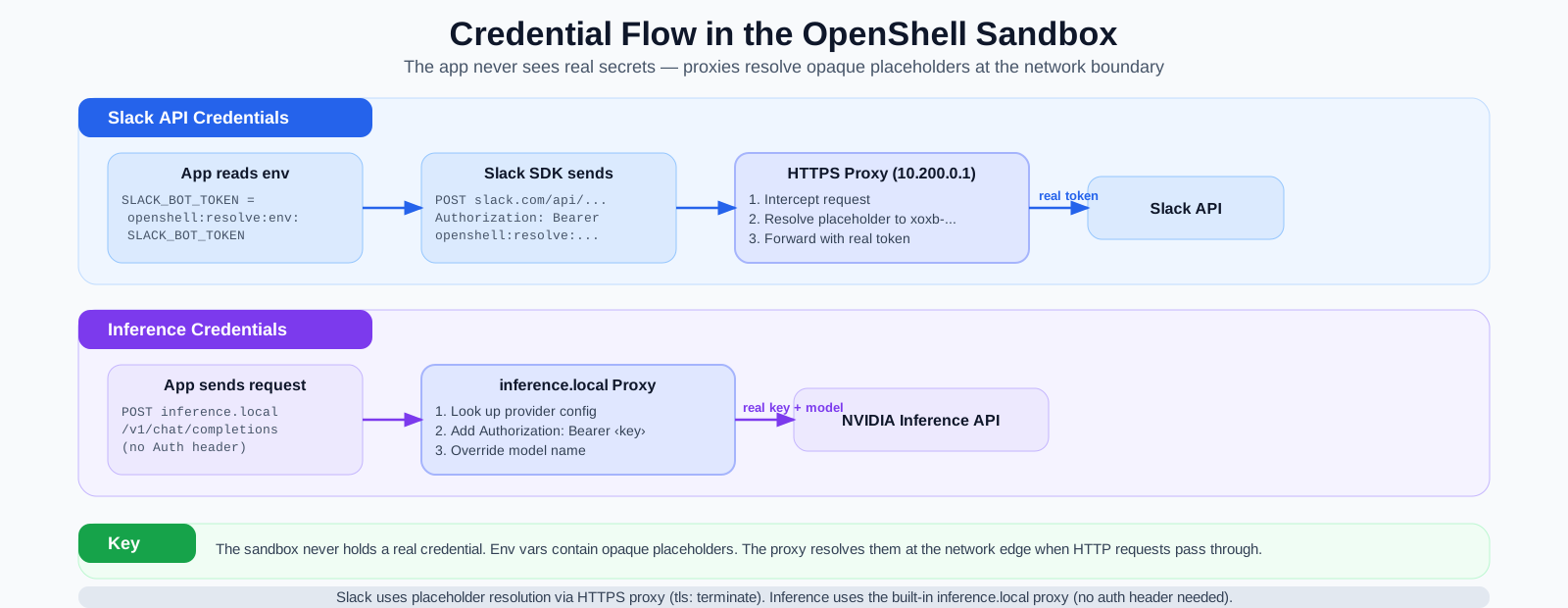
The two credential paths work differently:
Slack credentials use placeholder resolution. The app reads
SLACK_BOT_TOKEN=openshell:resolve:env:SLACK_BOT_TOKENfrom its environment. When the Slack SDK sends an HTTP request withAuthorization: Bearer openshell:resolve:..., the HTTPS proxy intercepts it, resolves the placeholder to the realxoxb-...token, and forwards the request to Slack.Inference credentials use the built-in
inference.localproxy. The app sends requests tohttps://inference.local/v1/chat/completionswith noAuthorizationheader at all. The proxy looks up the provider config, injects the real API key, overrides the model name, and forwards to the NVIDIA endpoint.
Implementation Walkthrough
This section walks through the three core M1 components: the Slack connector, the orchestrator, and the inference backend. All source links below point to commit 30bd097 — the final state of the M1 codebase before M2 work began.
Connector
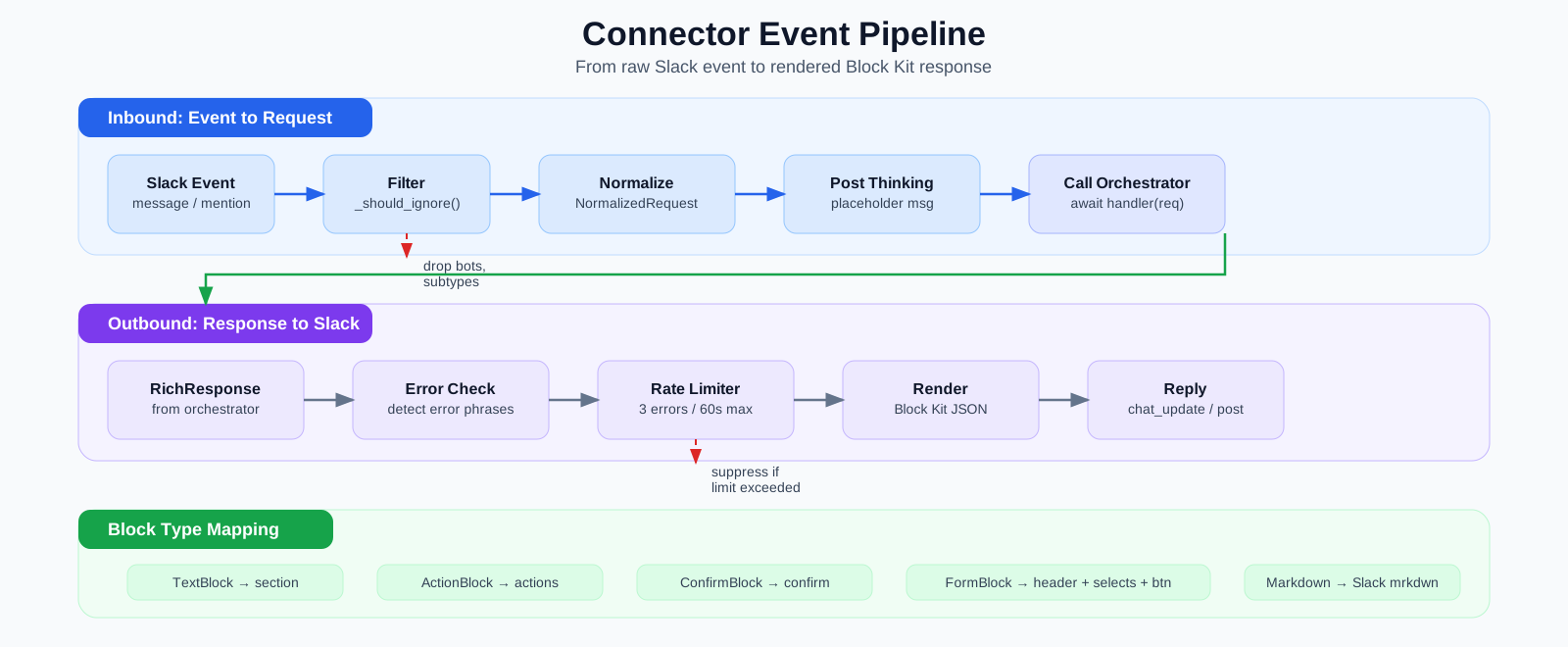
The Slack connector (connectors/slack.py) is the boundary between Slack’s event model and the orchestrator’s platform-neutral types. It handles three responsibilities: normalizing inbound events, managing the response lifecycle, and rendering platform-neutral blocks into Slack’s Block Kit format. No orchestration or inference logic live here - just the translation layer.
The connector contract
Every connector extends ConnectorBase (connectors/base.py):
MessageHandler = Callable[[NormalizedRequest], Awaitable[RichResponse]]

class ConnectorBase(ABC):
    def __init__(self, handler: MessageHandler) -> None:
        self._handler = handler

    @abstractmethod
    async def start(self) -> None: ...

    @abstractmethod
    async def stop(self) -> None: ...
The handler callback is the orchestrator’s handle method — the connector calls await self._handler(request) and gets back a RichResponse. It never knows what happens between those two points. This is the central isolation guarantee: adding a new platform (Discord, Telegram, a web UI) means writing one new ConnectorBase subclass. Nothing else changes.
Event listening and filtering
The Slack connector registers three Bolt listeners:
@self._app.event("message")
async def on_message(event, client):
    await self._on_event(event, client)

@self._app.event("app_mention")
async def on_mention(event, client):
    await self._on_event(event, client)

@self._app.action("")
async def on_action(ack, body, client):
    await ack()
    request = self._normalize_action(body)
    await self._handle_with_thinking(client, request)
All three funnel into the same pipeline: filter → normalize → thinking → orchestrate → reply. The thin closures only differ in how they extract a NormalizedRequest from the Slack payload.
Before any event is processed, it passes through _should_ignore:
def _should_ignore(self, event):
    if event.get("subtype") is not None:
        return True
    if event.get("bot_id"):
        return True
    if self._bot_user_id and event.get("user") == self._bot_user_id:
        return True
    return False
The subtype check is the most important line in this method. When the bot posts a “Thinking…” placeholder and later replaces it with chat_update, Slack emits a message_changed event. If the connector processes that event, it triggers another inference call, which posts another update, which emits another event — an infinite spam loop. Instead, it only processes events where subtype is None. Real user messages have no subtype. Everything else — bot_message, message_changed, message_deleted — is dropped. The bot_id and user ID checks are defense-in-depth for cases where a subtype might be missing but the message still originates from the bot.
Event normalization
Normalization strips away all Slack-specific structure and produces a platform-neutral NormalizedRequest:
@staticmethod
def _normalize(event):
    return NormalizedRequest(
        text=event.get("text", ""),
        user_id=event.get("user", ""),
        channel_id=event.get("channel", ""),
        thread_ts=event.get("thread_ts") or event.get("ts"),
        timestamp=time.time(),
        source="slack",
        raw_event=event,
    )
The thread_ts logic deserves attention. If the message is in a thread, thread_ts is the parent message’s timestamp — Slack’s way of identifying a thread. If it’s a top-level message, there is no thread_ts, so we fall back to ts (the message’s own timestamp). This matters because the orchestrator uses thread_ts as the key for conversation history: all messages in a thread share the same key, giving the model full thread context.
NormalizedRequest itself is a plain dataclass with no Slack imports:
@dataclass
class NormalizedRequest:
    text: str
    user_id: str
    channel_id: str
    timestamp: float
    source: str
    request_id: str = field(default_factory=lambda: uuid.uuid4().hex[:12])
    thread_ts: str | None = None
    action: ActionPayload | None = None
    raw_event: dict[str, object] = field(default_factory=dict)
The request_id is auto-generated and carried through every log line in the pipeline — orchestrator, backend, transcript repair — for end-to-end tracing (this will become important later when we collect traces and associated descendant traces with parent traces).
Action payloads (button clicks, dropdown selections) follow a parallel path through _normalize_action, which extracts the first action from Slack’s actions array and wraps it in an ActionPayload:
@staticmethod
def _normalize_action(body):
    actions = body.get("actions", [{}])
    action_data = actions[0] if actions else {}
    channel = body.get("channel", {})
    user = body.get("user", {})
    message = body.get("message", {})

    return NormalizedRequest(
        text=action_data.get("value", ""),
        user_id=user.get("id", ""),
        channel_id=channel.get("id", "") if isinstance(channel, dict) else str(channel),
        thread_ts=message.get("thread_ts") or message.get("ts"),
        timestamp=time.time(),
        source="slack",
        action=ActionPayload(
            action_id=action_data.get("action_id", ""),
            value=action_data.get("value", ""),
            metadata=action_data,
        ),
        raw_event=body,
    )
The thinking indicator pattern
Most chat bots post their response only after inference completes, leaving the user staring at nothing for several seconds. The connector inverts this with a thinking indicator — an immediate visible response that gets replaced in-place:
async def _handle_with_thinking(self, client, request):
    # 1. Post placeholder immediately
    thinking_ts = await self._post_thinking(client, channel, thread_ts)

    # 2. Call the orchestrator (inference happens here — the slow part)
    response = await self._handler(request)

    # 3. Render and replace the placeholder
    blocks = self.render(response)
    if thinking_ts:
        await self._update_message(client, channel, thinking_ts, text, blocks)
    else:
        await self._post_message(client, channel, thread_ts, text, blocks)
The flow is:
- Post “:hourglass_flowing_sand: Thinking…” via
chat_postMessage. Capture itsts(Slack’s message ID). - Call the orchestrator, which builds context, calls the model, repairs the transcript, and returns a
RichResponse. - Replace the thinking message in-place via
chat_updateusing the savedts.
If the thinking message fails to post (permissions, rate limits), the connector falls back to posting a new message after inference returns. If the chat_update fails, it falls back again to a new message. The user always gets a response.
Error propagation and rate limiting
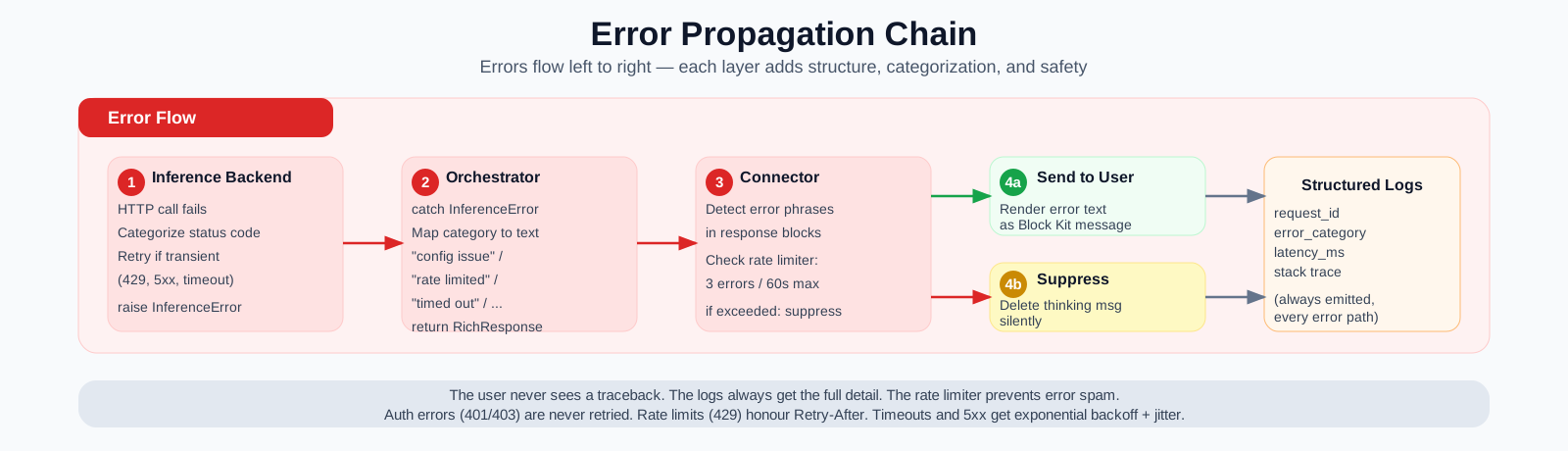
Errors flow from bottom to top through the full stack (see the source files linked below for the complete implementation):
- The inference backend (
inference_hub.py) raisesInferenceErrorwith a categorizedErrorCategory(auth, rate limit, timeout, model error, unknown). - The orchestrator (
orchestrator.py) catches it and returns aRichResponsecontaining a user-friendly error message — not a traceback. - The connector (
slack.py) receives thatRichResponseand checks whether it looks like an error. - If it is an error, the connector checks its per-channel rate limiter: at most 3 error messages per 60 seconds. If the limit is exceeded, the thinking indicator is silently deleted instead of being replaced with the error text.
This prevents the worst-case failure mode: a persistently broken backend generating one error message for every inbound user message in a busy channel.
Rendering: RichResponse → Block Kit
The orchestrator returns RichResponse objects containing platform-neutral blocks. The connector’s render() method translates each block into Slack Block Kit JSON.
The mapping is:
| Platform-neutral block | Slack Block Kit output |
|---|---|
TextBlock (markdown) |
section with mrkdwn text |
TextBlock (plain) |
section with plain_text |
ActionBlock |
actions with button elements |
ConfirmBlock |
section with a confirm dialog accessory |
FormBlock |
header + field sections with static_select + submit button |
_to_slack_markdown handles the conversion between standard Markdown (which LLMs produce) and Slack’s mrkdwn dialect. The key architectural point: none of this rendering logic exists in the orchestrator. If a Discord connector were added, it would implement its own render() targeting Discord embeds. The orchestrator’s output is always the same RichResponse regardless of destination.
Orchestrator
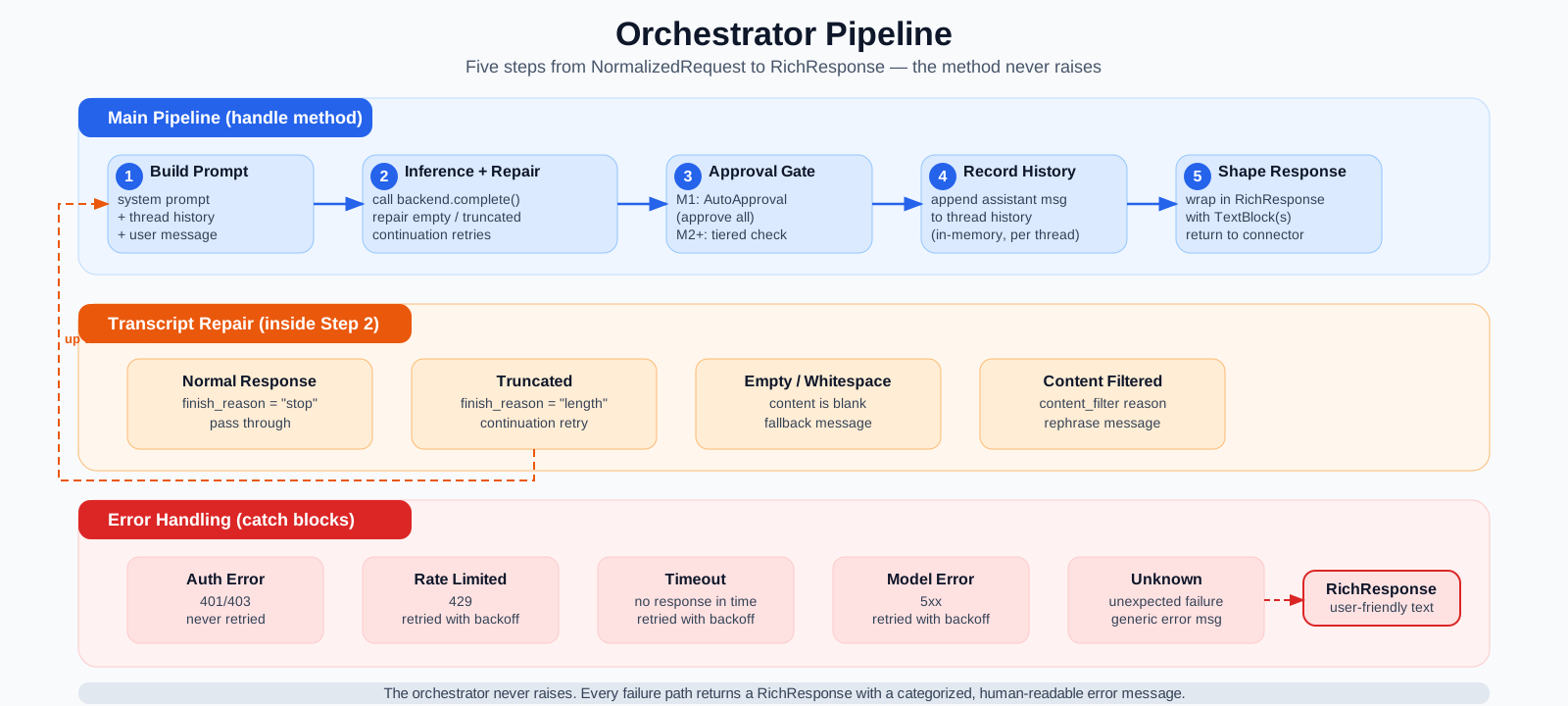
The orchestrator (orchestrator.py) is the center of the M1 agent loop. It owns the full request lifecycle: receive a platform-neutral request, build prompt context, call the inference backend, apply defensive output handling, check the approval gate, and return a platform-neutral response.
The orchestrator imports no platform SDK — no slack_sdk, no slack_bolt, no inference API. It communicates with connectors through NormalizedRequest / RichResponse and with backends through InferenceRequest / InferenceResponse. This isolation is the reason we can test the orchestrator without Slack credentials, swap inference providers without touching the control loop, and add new connectors without modifying the core.
Wiring: how the pieces connect
The entry point (main.py) shows how the three components are assembled:
backend = InferenceHubBackend(config.inference)
orchestrator = Orchestrator(backend, config.orchestrator)
connector = SlackConnector(
    handler=orchestrator.handle,
    bot_token=config.slack.bot_token,
    app_token=config.slack.app_token,
)
The orchestrator’s handle method matches the MessageHandler callback signature. It is passed to the connector as a plain function reference — the connector calls it without knowing (or needing to know) anything about the orchestrator’s internal structure.
The handle() method: the full agent loop
handle() is the orchestrator’s only public method. Every inbound request passes through it:
async def handle(self, request: NormalizedRequest) -> RichResponse:
    thread_key = request.thread_ts or request.request_id

    try:
        # 1. Build prompt context
        messages = self._prompt.messages_for_inference(thread_key, request.text)

        # 2. Call inference with transcript repair
        content = await self._inference_with_repair(messages, request.request_id)

        # 3. Check approval gate
        approval = await self._approval.check(
            "respond", {"content": content, "request_id": request.request_id}
        )
        if not approval.approved:
            content = "I generated a response but it was not approved. ..."

        # 4. Commit turn to thread history (only after success)
        self._prompt.commit_turn(thread_key, request.text, content)

        # 5. Shape and return
        return self._shape_response(request, content)

    except InferenceError as exc:
        return self._error_response(request, exc.category)
    except Exception:
        return self._error_response(request, ErrorCategory.UNKNOWN)
These five steps are clearly defined and testable in isolation. The outer try/except guarantees the method never raises — it always returns a RichResponse, even on failure. This is important because the connector is waiting for a response to replace the thinking indicator. An unhandled exception would leave a dangling “Thinking…” message in the channel forever.
Context assembly: PromptBuilder
The prompt sent to the model is always: system prompt + full thread history + latest user message. The PromptBuilder class (prompt_builder.py) encapsulates this logic, extracted from the orchestrator so prompt construction can evolve independently of the control loop:
class PromptBuilder:
    def __init__(self, system_prompt: str, max_thread_history: int) -> None:
        self._system_prompt = system_prompt
        self._max_history = max_thread_history
        self._thread_history: dict[str, list[dict[str, str]]] = defaultdict(list)

    def messages_for_inference(self, thread_key: str, user_text: str) -> list[dict[str, str]]:
        hist = self.history_with_user_message(thread_key, user_text)
        return [{"role": "system", "content": self._system_prompt}] + hist

    def history_with_user_message(self, thread_key: str, user_text: str) -> list[dict[str, str]]:
        hist = list(self._thread_history[thread_key])
        hist.append({"role": "user", "content": user_text})
        if len(hist) > self._max_history:
            return hist[-self._max_history :]
        return hist

    def commit_turn(self, thread_key: str, user_text: str, assistant_content: str) -> None:
        hist = self.history_with_user_message(thread_key, user_text)
        hist.append({"role": "assistant", "content": assistant_content})
        self._thread_history[thread_key] = hist
The key design choice is the commit semantics: messages_for_inference builds the prompt without mutating history. The orchestrator only calls commit_turn after a successful model round-trip, so failed requests never pollute the conversation. This prevents a half-written assistant message from appearing in the context for the next user message after a crash or timeout.
Thread history is keyed by thread_ts — the same key the connector derives during normalization. All messages in a Slack thread share the same key, so the model sees the full conversation context.
History is capped at a configurable maximum (default 50 messages). When exceeded, the oldest messages are dropped from the front. This prevents unbounded memory growth in long-running conversations. The cap is a simple sliding window — more sophisticated approaches (summarization, semantic compression) are deferred to M4 (memory orchestration). This kind of context management is an active area of development and research, and even more mature systems like OpenClaw and Hermes are undergoing changes and experimentation in this domain.
The system prompt is loaded once at startup from a file (defaulting to prompts/system_prompt.md), with a built-in fallback. History is in-memory only. It survives across messages within a process lifetime but is lost on restart. Persistent conversation storage is an M5 concern.
Inference dispatch and transcript repair
After building the prompt, the orchestrator calls the inference backend. But it doesn’t just fire one request and return the result. It wraps the call in a transcript-repair loop that handles empty replies, truncated output, and content-filter blocks:
async def _inference_with_repair(self, messages, request_id):
    accumulated_content = ""

    for attempt in range(1 + MAX_CONTINUATION_RETRIES):
        if attempt > 0:
            messages = messages + [
                {"role": "assistant", "content": accumulated_content},
                {"role": "user", "content": CONTINUATION_PROMPT},
            ]

        inference_request = InferenceRequest(
            messages=messages,
            model=self._config.model,
            temperature=self._config.temperature,
            max_tokens=self._config.max_tokens,
        )
        result = await self._backend.complete(inference_request)

        repair = repair_response(result, request_id)

        if repair.was_repaired and not repair.needs_continuation:
            return repair.content

        accumulated_content += repair.content

        if not repair.needs_continuation:
            return accumulated_content

    return accumulated_content
repair_response (transcript_repair.py) inspects the raw model output and returns a RepairResult:
| Condition | Action | Continuation? |
|---|---|---|
| Empty or whitespace-only content | Replace with fallback: “I wasn’t able to generate a response. Could you rephrase?” | No |
finish_reason="length" (truncated) |
Keep the partial content, flag for continuation | Yes |
finish_reason="content_filter" |
Replace with: “My response was filtered. Could you rephrase your request?” | No |
| Normal response | Pass through unchanged | No |
When continuation is needed, the orchestrator appends the partial output as an assistant message followed by a continuation prompt:
"Resume directly, no apology, no recap. Pick up mid-thought.
Break remaining work into smaller pieces."
This mirrors Claude Code’s continuation strategy — no “I apologize for the interruption” padding, just a clean resume. Up to 2 continuation retries are attempted. Content from successive attempts is concatenated. If all retries are exhausted, the partial content is returned as-is.
The inference backend contract
The orchestrator calls self._backend.complete(request) and receives an InferenceResponse. It never knows which provider is behind the call — the BackendBase interface isolates that entirely. The full backend implementation, including retry logic, error categorization, and the local-vs-sandbox credential split, is covered in the Inference Backend section below.
The approval gate
After inference succeeds, the response passes through an approval gate:
approval = await self._approval.check(
    "respond", {"content": content, "request_id": request.request_id}
)
In M1 this is AutoApproval — a stub that approves everything. There are no tools in M1, so there are no side effects to gate. But the interface is scaffolded now so M2 can plug in a tiered classifier (fast-path pattern matching for safe reads, LLM classifier for ambiguous operations, Slack escalation for dangerous writes) without restructuring the loop.
Response construction
The final step wraps the plain-text content in a platform-neutral RichResponse:
@staticmethod
def _shape_response(request, content):
    return RichResponse(
        channel_id=request.channel_id,
        thread_ts=request.thread_ts,
        blocks=[TextBlock(text=content)],
    )
In M1 this is always a single TextBlock. The block-list structure exists because M2+ responses will include ActionBlock (approve/reject buttons), ConfirmBlock (dangerous-action confirmations), and FormBlock (structured input). The connector renders whatever blocks it receives — it doesn’t need to know whether the response is a simple text reply or a multi-block interactive form.
Error responses follow the same pattern but with category-specific messages:
@staticmethod
def _error_response(request, category):
    messages = {
        ErrorCategory.AUTH_ERROR: "I'm having a configuration issue ...",
        ErrorCategory.RATE_LIMIT: "I'm being rate-limited right now ...",
        ErrorCategory.TIMEOUT: "The model didn't respond in time ...",
        ErrorCategory.MODEL_ERROR: "Something went wrong with the model ...",
        ErrorCategory.UNKNOWN: "Something unexpected happened ...",
    }
    return RichResponse(
        channel_id=request.channel_id,
        thread_ts=request.thread_ts,
        blocks=[TextBlock(text=messages.get(category, messages[ErrorCategory.UNKNOWN]))],
    )
Each ErrorCategory maps to a non-technical message. The user never sees a Python traceback. The full exception is logged server-side with structured JSON (including error_category, request_id, and latency_ms) for debugging.
Observability
Every step in the pipeline emits structured JSON logs (logging.py). A single request generates a trace like:
{"component": "slack_connector", "message": "Request received", "request_id": "a3f8b2c1d4e5", "user_id": "U...", "channel_id": "C..."}
{"component": "orchestrator", "message": "Prompt built", "request_id": "a3f8b2c1d4e5", "history_length": 4}
{"component": "inference_hub", "message": "Inference call starting", "request_id": "a3f8b2c1d4e5", "model": "azure/anthropic/claude-opus-4-6"}
{"component": "inference_hub", "message": "Inference call completed", "request_id": "a3f8b2c1d4e5", "latency_ms": 2847.3, "prompt_tokens": 312, "completion_tokens": 89}
{"component": "orchestrator", "message": "Request completed", "request_id": "a3f8b2c1d4e5", "latency_ms": 2891.1}
{"component": "slack_connector", "message": "Response sent (updated thinking message)", "request_id": "a3f8b2c1d4e5", "channel_id": "C..."}
The request_id ties every log line together. Token counts and latencies are recorded for cost and performance tracking. Error categories are logged so failure modes can be aggregated. All of this runs through a single JSONFormatter that writes to stdout (and optionally a file), making it easy to pipe into any log aggregation system.
For M1, stdout JSON logs are sufficient. A later milestone will extend this to a persistent audit log or database so request traces, token usage, and error rates can be queried after the fact — this is a prerequisite for the self-improvement loop planned in M6.
Inference Backend
The inference backend (backends/) is the boundary between the orchestrator and the model provider. Its job is to turn an InferenceRequest into an InferenceResponse while hiding every provider-specific detail: authentication, retry logic, timeout enforcement, and error categorization.
The BackendBase contract
Every backend implements BackendBase (base.py):
class BackendBase(ABC):
    @abstractmethod
    async def complete(self, request: InferenceRequest) -> InferenceResponse: ...

    async def close(self) -> None: ...
The contract is intentionally minimal. complete() sends an OpenAI-format message list and returns a structured response. close() releases held resources. Retry logic, timeout enforcement, and error categorization are the responsibility of each concrete implementation — the orchestrator never retries on its own.
Adding a new provider (OpenAI, Anthropic, a local vLLM server) means creating one new BackendBase subclass. Nothing else changes — the orchestrator and connector code stay untouched.
HTTP client setup
The InferenceHubBackend (inference_hub.py) wraps an httpx.AsyncClient configured at construction time:
headers: dict[str, str] = {"Content-Type": "application/json"}
if config.api_key:
    headers["Authorization"] = f"Bearer {config.api_key}"

self._client = httpx.AsyncClient(
    base_url=config.base_url,
    headers=headers,
    timeout=httpx.Timeout(config.timeout_s, connect=10.0),
)
The conditional Authorization header handles the local-vs-sandbox credential split. Locally, the app sends the API key from .env directly. Inside an OpenShell sandbox, config.api_key is empty — the inference.local proxy injects the real key before forwarding upstream (see Lesson #11). This means the same code works in both environments without any branching — the absence of a key is the signal.
The retry loop
The complete() method wraps _send_request in a tenacity AsyncRetrying loop:
async for attempt in AsyncRetrying(
    retry=retry_if_exception_type(_RetryableError),
    wait=self._wait_for_retry,
    stop=stop_after_attempt(self._config.max_retries),
    before_sleep=self._log_retry,
    reraise=True,
):
    with attempt:
        return await self._send_request(payload, request.model, request.request_id)
Response parsing and finish_reason
On a successful 200 response, _parse_response extracts the three pieces the orchestrator needs:
choice = data["choices"][0]
content = choice["message"]["content"]
finish_reason = choice.get("finish_reason", "stop")
The content is the model’s reply. The finish_reason is critical for the transcript-repair layer: "stop" means the model finished normally, "length" means it hit the token limit and was truncated, and "content_filter" means the output was blocked. The orchestrator’s _inference_with_repair method uses this signal to decide whether to request a continuation (see Inference dispatch and transcript repair).
Token usage counters (prompt_tokens, completion_tokens, total_tokens) are extracted and logged for cost tracking. If the response body is malformed (missing choices, missing message.content), the backend raises InferenceError with MODEL_ERROR rather than letting a KeyError propagate as an unclassified failure.
Provider swappability in practice
The entire backend contract is designed so the orchestrator never imports provider-specific code. Swapping NVIDIA Inference Hub for a different provider means:
- Write a new
BackendBasesubclass (e.g.OpenAIBackend,VLLMBackend). - Change one line in
main.py:backend = NewBackend(config). - If running in an OpenShell sandbox, register a new provider and configure inference routing for the new endpoint (see Steps 7–8). The network policy may also need an entry if the new provider uses a different host.
- Nothing else changes — the orchestrator, connector, transcript repair, and tests all work identically.
Running locally without a sandbox, only steps 1–2 apply. The OpenShell layer (step 3) is an additional concern only because the sandbox mediates all outbound traffic — the application code itself is unchanged.
OpenShell — Lessons Learned
This section documents every issue I hit deploying the M1 orchestrator inside an OpenShell sandbox. These are hard-won debugging nuggets that will save you (or your agent) time.
1. The openshell CLI changes between versions — check subcommands
OpenShell 0.0.6 used provider add, credential set, sandbox remove, and sandbox stop. By 0.0.21, these were provider create, sandbox delete, and there is no credential subcommand at all. Always run openshell <command> --help before scripting against the CLI. The Makefile I shipped was written against a hallucinated API and every command was wrong. By the time you try out Nemoclaw Escapades the OpenShell interface may have changed in non-backwards compatible ways. The documentation for this repo (and pyproject.toml) will point you to the OpenShell version this project is working with.
Fix: Run --help on every subcommand. Don’t guess.
2. Dockerfiles must include README.md for hatchling builds
Our pyproject.toml declares readme = "README.md". Hatchling (the build backend) validates this at metadata generation time. If the Dockerfile only copies pyproject.toml and src/ into the builder stage, the build fails with OSError: Readme file does not exist: README.md.
Fix: COPY pyproject.toml README.md ./ in the builder stage.
3. OpenShell’s --from flag and the build context trap
When openshell sandbox create --from <path> receives a Dockerfile path, it uses the Dockerfile’s parent directory as the build context. If your Dockerfile lives in docker/Dockerfile.orchestrator, the context is docker/ — which doesn’t contain pyproject.toml, src/, or README.md.
When given a directory path, OpenShell uses that directory as context and looks for a Dockerfile inside it.
Fix: We create a temporary symlink Dockerfile -> docker/Dockerfile.orchestrator at the project root, pass --from ., and remove the symlink after. The symlink is in .gitignore. This is documented in the Makefile with a full explanation.
4. The python:3.11-slim image doesn’t meet OpenShell sandbox requirements
OpenShell 0.0.21+ requires every sandbox image to include:
- A
sandboxuser and group (the supervisor drops privileges to this user) iproute2(the supervisor uses it to create network namespaces for proxy isolation)
The stock python:3.11-slim has neither. The supervisor crashes with clear error messages:
sandbox user 'sandbox' not found in imageNetwork namespace creation failed [...]
Ensure CAP_NET_ADMIN and CAP_SYS_ADMIN are available
and iproute2 is installedFix: Add both to the Dockerfile:
RUN apt-get update && apt-get install -y --no-install-recommends iproute2 \
    && rm -rf /var/lib/apt/lists/* \
    && groupadd -r sandbox && useradd -r -g sandbox -d /app -s /bin/bash sandbox
5. Do NOT set USER or ENTRYPOINT in the Dockerfile
OpenShell replaces the image’s entrypoint with its own supervisor binary (/opt/openshell/bin/openshell-sandbox). The supervisor must start as root to apply Landlock policies and set up network namespaces before dropping privileges to the sandbox user (specified in the policy’s process section).
If the Dockerfile sets USER sandbox, the supervisor can’t apply policies and crash-loops. If it sets ENTRYPOINT, it’s ignored anyway.
The actual application command is passed via -- <cmd> on openshell sandbox create.
6. Credential injection uses opaque placeholders, not real values
OpenShell never exposes real credentials inside the sandbox. Environment variables contain placeholder tokens like openshell:resolve:env:SLACK_BOT_TOKEN. The proxy resolves these placeholders in HTTP request headers when traffic passes through it.
I confirmed this with a test script (scripts/test_credential_injection.sh) that creates a provider, spins up an ephemeral sandbox, and dumps env | sort. All three credentials showed placeholder values, not the real tokens from .env.
7. The proxy routes ALL outbound traffic — HTTPS_PROXY is set automatically
Inside the sandbox, OpenShell sets HTTPS_PROXY=http://10.200.0.1:3128 and installs its own CA certificate (SSL_CERT_FILE, REQUESTS_CA_BUNDLE, CURL_CA_BUNDLE). All outbound HTTPS traffic goes through this proxy, which enforces network policies, resolves credential placeholders, and terminates TLS.
8. Python’s CONNECT tunneling vs OpenShell’s REST proxy mode
This was the hardest bug to diagnose. The OpenShell proxy supports two modes for endpoints:
protocol: rest+tls: terminate: The proxy expects the client to send a regular HTTP request. The proxy terminates TLS itself and can inspect/modify headers (resolving credential placeholders).access: full: The proxy creates a CONNECT tunnel (opaque TCP passthrough). No header inspection.
The problem: Python’s HTTP libraries (httpx, urllib3) send CONNECT host:443 requests through an HTTPS proxy. This is standard HTTP proxy behavior. But OpenShell’s proxy rejects CONNECT requests for endpoints configured with protocol: rest. It returns 403 Forbidden.
Node.js-based tools (Claude Code, OpenClaw) send regular HTTP requests through the proxy instead of CONNECT, which is why the reference NemoClaw policy lists the inference endpoint with protocol: rest and it works — for Node.
The workaround for Python: Use inference.local instead of hitting the inference API directly. inference.local is OpenShell’s built-in inference proxy endpoint. The app sends requests to https://inference.local/v1/... and the proxy handles authentication, routing, and forwarding to the real upstream. No CONNECT tunnel is needed because inference.local resolves locally inside the sandbox’s network namespace.
For Slack, the split is:
slack.comwithprotocol: rest+tls: terminatefor HTTP API calls (auth.test, chat.postMessage, apps.connections.open)*.slack.comwithaccess: fullfor the long-lived Socket Mode WebSocket (theaccess: fullCONNECT tunnel avoids the proxy’s HTTP idle timeout killing the connection — same pattern as Discord in the reference policy)
9. Inference routing must be configured separately
Having an inference provider registered (openshell provider create) is not enough. You must also configure inference routing so the gateway knows how to forward requests from inference.local to the real upstream:
openshell inference set --provider inference-hub --model "azure/anthropic/claude-opus-4-6"Without this, inference.local returns 503 Unknown (no route configured).
10. --type nvidia vs --type openai for the inference provider
(See also Step 7: Register the Inference Provider)
OpenShell supports multiple provider types for inference routing. At first glance, --type nvidia seems like the natural choice. It doesn’t work for many endpoints — and the failure mode is a confusing 404.
The problem with --type nvidia:
# DON'T DO THIS unless your endpoint is integrate.api.nvidia.com
openshell provider create \
    --name inference-hub \
    --type nvidia \
--credential "NVIDIA_API_KEY=$(grep INFERENCE_HUB_API_KEY .env | cut -d= -f2-)"- The
nvidiatype defaults tointegrate.api.nvidia.com— which may not match your actual endpoint - The sandbox gets
HTTP/1.1 404 Unknownfrominference.localand the error gives no hint that the upstream endpoint is wrong - We verified this failure in production: the provider registers fine,
openshell inference getshows the routing, but every inference call 404s
The fix — use --type openai with an explicit base URL:
openshell provider create \
    --name inference-hub \
    --type openai \
    --credential "OPENAI_API_KEY=$(grep INFERENCE_HUB_API_KEY .env | cut -d= -f2-)" \
--config "OPENAI_BASE_URL=$(grep INFERENCE_HUB_BASE_URL .env | cut -d= -f2-)"- Credential key:
OPENAI_API_KEY(required by theopenaitype regardless of which provider you’re actually hitting) - Base URL: must be overridden explicitly via
--config, otherwise it defaults toapi.openai.com - This works for any OpenAI-compatible endpoint (
/v1/chat/completions)
Comparison:
| Aspect | --type nvidia |
--type openai |
|---|---|---|
| Credential key name | NVIDIA_API_KEY |
OPENAI_API_KEY |
| Default base URL | integrate.api.nvidia.com |
api.openai.com |
| Configurable base URL | No | Yes, via --config "OPENAI_BASE_URL=..." |
| Works with custom endpoints | No — 404 unless it matches the default | Yes |
Works with integrate.api.nvidia.com |
Yes | Yes (with config override) |
Inference routing (openshell inference set) |
Yes | Yes |
NVIDIA exposes three surfaces for inference, but only two are API endpoints — and they serve completely disjoint model catalogs (zero overlap):
| build.nvidia.com | integrate.api.nvidia.com |
inference-api.nvidia.com |
|
|---|---|---|---|
| What it is | Web portal / playground | OpenAI-compatible API | OpenAI-compatible API |
| Default for | — (not an API) | --type nvidia |
— (use --type openai + config) |
| Total models | — | ~186 | ~139 |
| Closed-source | — | None | Claude, GPT, Gemini, o1/o3/o4, Perplexity Sonar |
| Open-weight | Browse & test | Llama, Nemotron, Qwen, Mistral, Gemma, DeepSeek, Phi, Granite, Kimi, etc. | Llama, Nemotron, Qwen (via nvidia/, nvcf/ prefixes) |
| Naming scheme | — | Flat: meta/llama-3.3-70b-instruct |
Provider-routed: azure/anthropic/claude-opus-4-6 |
Auth for /v1/models |
— | Not required | Required |
| Shared models | — | 0 shared between the two APIs | 0 shared between the two APIs |
build.nvidia.com is a web UI for browsing and testing models — it is not an API endpoint. The API behind it is integrate.api.nvidia.com. API keys created on build.nvidia.com work with both API endpoints.
This is why --type nvidia returns 404 for models like azure/anthropic/claude-opus-4-6 — the two APIs don’t share a single model, and that ID only exists on inference-api.nvidia.com. To check which models are available to you, query the /v1/models endpoint with your API key:
curl -s -H "Authorization: Bearer $INFERENCE_HUB_API_KEY" \
    "$INFERENCE_HUB_BASE_URL/models" | python3 -m json.tool
Why not --type generic? The generic type injects credentials via env var placeholders, but it is not compatible with openshell inference set. Without inference routing, the sandbox has no inference.local endpoint — the app would have to call the upstream API directly, which Python’s HTTP libraries route through a CONNECT tunnel that the proxy rejects (see Lesson #8).
11. The inference proxy injects the API key — the app must NOT send one
When using inference.local, the proxy adds Authorization: Bearer <real-key> to the request before forwarding upstream. If the app also sends an Authorization header (even an empty Bearer), it conflicts.
With an empty API key, httpx rejects the header entirely: Illegal header value b'Bearer '.
Fix: Only add the Authorization header when the app has a real key (local development). In the sandbox, omit it and let the proxy inject it:
headers = {"Content-Type": "application/json"}
if config.api_key:
    headers["Authorization"] = f"Bearer {config.api_key}"
12. The openshell inference set --model forces the model name
The --model parameter on openshell inference set overrides whatever model the app requests. If you configure claude-opus-4.6 (dotted) but the API expects claude-opus-4-6 (hyphenated), every request fails with 401 even though the key is valid.
Fix: The model name in the routing config must exactly match what the upstream API accepts. Verify with make test-auth or a direct curl.
13. Bot message spam loops from message_changed events
When the bot posts a “Thinking…” placeholder and then updates it with chat_update, Slack generates a message_changed event. Our original _should_ignore filter only caught subtype=bot_message, not message_changed. Each error response update triggered a new processing cycle, creating an infinite spam loop.
Fix: Filter ALL events with any subtype — only process events where subtype is None (real user messages):
if event.get("subtype") is not None:
    return True
14. Error response rate limiting prevents the worst-case spam
Even with proper message filtering, a persistently failing backend can still generate error messages for every inbound user message in a busy channel. We added a per-channel rate limiter: at most 3 error messages per 60 seconds. After that, error responses are silently suppressed (the thinking indicator is deleted).
15. Network policy field reference for Python-based sandboxes
Here is the minimum viable policy structure for a Python app in OpenShell, based on everything we learned. The full policy used by this project lives at policies/orchestrator.yaml.
network_policies:
  slack_api:
    endpoints:
      - host: slack.com
        port: 443
        protocol: rest
        enforcement: enforce
        tls: terminate
        rules:
          - allow: { method: GET, path: "/**" }
          - allow: { method: POST, path: "/**" }
    binaries:
      - { path: /usr/local/bin/python* }

  slack_websocket:
    endpoints:
      - host: "*.slack.com"
        port: 443
        access: full
    binaries:
      - { path: /usr/local/bin/python* }

  inference:
    endpoints:
      - host: inference.local
        port: 443
        protocol: rest
        enforcement: enforce
        tls: terminate
        rules:
          - allow: { method: GET, path: "/**" }
          - allow: { method: POST, path: "/**" }
    binaries:
      - { path: /usr/local/bin/python* }
16. Sandbox provisioning is slow the first time
The first openshell sandbox create pulls images into the k3s cluster’s containerd store (separate from Docker Desktop’s cache). The OpenShell base image is ~1 GB and custom images need to be built and pushed. Expect 1-3 minutes for the first sandbox. Subsequent creates reuse cached layers and take seconds.
17. Use openshell doctor exec to debug sandbox issues
When the sandbox is stuck or crash-looping:
openshell doctor exec -- kubectl get pods -n openshell
openshell doctor exec -- kubectl describe pod <name> -n openshell
openshell doctor exec -- kubectl logs <name> -n openshell --all-containers=true
This is how we discovered the sandbox user not found and iproute2 missing errors — the openshell logs command only showed the sidecar, not the crash reason.
18. Gateway lifecycle: stopped ≠ destroyed, but start doesn’t restart
(See also Step 6: Start the OpenShell Gateway)
The gateway is a Docker container running k3s. It can be in one of three states: running, stopped (container exists but is not running), or destroyed (container removed). The openshell CLI does not handle all transitions cleanly:
| Situation | What happens |
|---|---|
| No gateway exists | openshell gateway start creates one from scratch. Downloads the image (~200 MB, 1-2 min). |
| Gateway is running | openshell gateway start detects it and does nothing. openshell status works. |
| Gateway is stopped (any reason) | openshell gateway start does not restart it. It asks “Destroy and recreate? [y/N]”. |
This is true even after a clean openshell gateway stop — the CLI has no “restart a stopped container” path as of v0.0.21. Verified:
$ openshell gateway stop          # clean stop
✓ Gateway openshell stopped.
$ openshell gateway start         # try to restart
! Gateway 'openshell' already exists (stopped).
Destroy and recreate? [y/N] N
Keeping existing gateway.          # ← still stopped, connection refused
The “Destroy and recreate?” prompt gives you two options, both bad. Your real options are:
Answer
Y(or pass--recreate): destroys the container and the cached image, then re-downloads everything (~200 MB, 1-2 min). Providers and inference routing config are lost — you must re-run Steps 7-10.Answer
N: the stopped container stays stopped.openshell statusstill returnsconnection refused. This is almost never what you want.Restart the Docker container directly:
docker start openshell-cluster-openshell, then verify withopenshell status. The container name follows the patternopenshell-cluster-<gateway-name>(default name isopenshell). This is the fastest path — it preserves the image, all provider registrations, and inference routing config. The downside is that it sidesteps the CLI.
My recommendation: Always use docker start openshell-cluster-openshell to bring back a stopped gateway. Reserve --recreate for cases where the gateway is genuinely broken and you need a fresh start. This is an OpenShell v0.0.21 limitation — the CLI has no working restart path for stopped gateways.
The Makefile’s setup-gateway target automates this three-way check: if the gateway is already running it does nothing; if the container exists but is stopped it restarts it via docker start (preserving providers and routing); and only if no container exists at all does it fall back to a fresh openshell gateway start. Running make setup-gateway (or any target that depends on it, like make setup or make run-local-sandbox) handles the right path automatically.
19. Why HTTP credentials are sufficient for Slack Socket Mode
(See also Step 9: Register the Slack Provider and Step 10: Understand the Sandbox Network Policy)
At first glance it’s surprising that registering HTTP credentials (SLACK_BOT_TOKEN, SLACK_APP_TOKEN) is enough for a WebSocket-based connection. The reason is that Slack Socket Mode authenticates in two phases, each using a different proxy mode:
sequenceDiagram
    participant App as Sandbox App
    participant Proxy as OpenShell Proxy
    participant API as slack.com
    participant WS as wss-primary.slack.com

    rect rgb(239, 246, 255)
    Note over App,API: slack_api — protocol: rest, tls: terminate
    App->>Proxy: POST apps.connections.open<br/>Authorization: Bearer openshell:resolve:…
    Note over Proxy: Terminate TLS, inspect headers<br/>Resolve placeholder → real xapp-… token
    Proxy->>API: POST apps.connections.open<br/>Authorization: Bearer xapp-real-token
    API-->>Proxy: 200 OK + wss:// URL with session ticket
    Proxy-->>App: 200 OK + wss:// URL
    end

    rect rgb(245, 243, 255)
    Note over App,WS: slack_websocket — access: full (CONNECT tunnel)
    App->>Proxy: CONNECT wss-primary.slack.com:443
    Note over Proxy: Opaque TCP passthrough<br/>No header inspection
    Proxy->>WS: TCP tunnel established
    App-->>WS: WebSocket upgrade (ticket in URL, no Auth header)
    Note over App,WS: Long-lived WebSocket — events stream continuously
    end
HTTP handshake (
slack_apipolicy) — the SDK callsapps.connections.openover HTTPS, sending theSLACK_APP_TOKENin theAuthorizationheader. The OpenShell proxy intercepts this request (protocol: rest,tls: terminate), resolves theopenshell:resolve:env:SLACK_APP_TOKENplaceholder to the real token, and forwards toslack.com.WebSocket connection (
slack_websocketpolicy) — the HTTP response includes a one-time WebSocket URL (wss://wss-primary.slack.com/...) with an embedded session ticket in the URL itself. The subsequent WebSocket connection authenticates via this ticket — noAuthorizationheader is needed. The proxy creates an opaque CONNECT tunnel (access: full) with no header inspection. This avoids the proxy’s HTTP idle timeout (~2 min) killing the long-lived connection.
This is why the network policy needs two separate entries for Slack: slack_api for credential resolution via REST interception, and slack_websocket for the long-lived WebSocket via CONNECT tunnel.
Troubleshooting
If the sandbox fails to start or crash-loops, use this debugging ladder to isolate the issue.
Check pod status:
openshell doctor exec -- kubectl get pods -n openshellCrashLoopBackOff→ the container keeps crashing. Get logs:
openshell doctor exec -- kubectl logs <pod-name> -n openshell --all-containers=trueImagePullBackOff→ the image isn’t in the cluster. Rebuild withmake setup-sandbox.Provisioning(stuck) → usually waiting for image pull. Check withopenshell sandbox list.
Common crash-loop causes:
| Error | Cause | Fix |
|---|---|---|
sandbox user 'sandbox' not found |
Image missing sandbox user |
Add groupadd/useradd to Dockerfile |
Network namespace creation failed [...] iproute2 |
Image missing iproute2 |
Add apt-get install iproute2 to Dockerfile |
ModuleNotFoundError: No module named 'aiohttp' |
Missing Python dependency | Add aiohttp to pyproject.toml |
ProxyError: 403 Forbidden |
Network policy blocks the endpoint | Check policies/orchestrator.yaml |
Authentication failed (401) |
Wrong API key or model name | Verify with make test-auth |
Check the applied policy:
openshell sandbox get orchestratorThis shows the policy as the sandbox actually sees it — not just what’s in the YAML file on disk.
Hot-reload the policy (for dynamic fields like network_policies):
openshell policy set orchestrator --policy policies/orchestrator.yamlThis takes effect immediately without rebuilding the image or recreating the sandbox.
What Is Next in M2
M1 answers the first question in the series: what is an agent system made of? The answer, in practice, is a connector, an orchestrator, and an inference backend — with explicit contracts between them. Everything else (tools, delegation, memory, review, self-improvement) is layered on top.
The next post, M2, adds a sandboxed coding agent: a delegated sub-agent that can write files, run commands, and execute code inside an OpenShell sandbox. The orchestrator gains tool-use dispatch, the approval gate becomes real, and the system starts doing work instead of just chatting.
Sources and References
Project documentation
Design notes and deep dives for this project live in nemoclaw_escapades:
docs/design.md— system shape, goals, and constraintsdocs/deep_dives/hermes_deep_dive.md— architecture notes on Hermesdocs/deep_dives/openclaw_deep_dive.md— architecture notes on OpenClawdocs/deep_dives/openshell_deep_dive.md— architecture notes on OpenShelldocs/deep_dives/nemoclaw_deep_dive.md— architecture notes on NemoClaw